Summary
- Create CloudAhoy groups, and invite people to them.
- Join CloudAhoy groups.
- Share any flight with the entire group.
- Debrief the flight in the Debrief tab, or select a flight in the Flights tab
- Click the “Share” button (on the top bar)
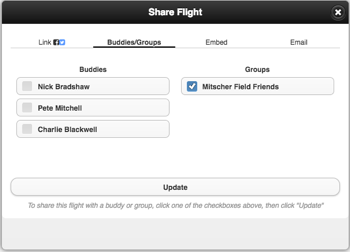
- A dialog opens. Select “buddies/groups”
- Check/uncheck groups that the flight should be shared with.
- Click “Save”.
This flight is now in the flight list of the either the admins only, or all the group’s members, depending on the policy as defined by the group admin(s).
Further Reading
Creating and editing Groups
Crew members
Share a flight in email
Share on your Facebook or Twitter page
Create a flight-share link
Embed a flight debrief in a web page
Share with a buddy