Summary
Create, manage, and list Groups for sharing of flights.
You can create a Group, invite pilots to the group, and accept invitation to be part of a group.
Pilots who are members of the group can share flights with that group.
Groups are useful for flight schools, CFIs, clubs, squadrons, etc.
Groups are created with policies. According to what the policy allows, a flight shared with the group will show up in the flights list of each group member, or only in the flight list of the administrators of the group.
Create a group – step by step:
- Scroll down the Account tab to the Groups section,

- Tap “New Group”, fill in the form and save. You are automatically added to the group as an Administrator.
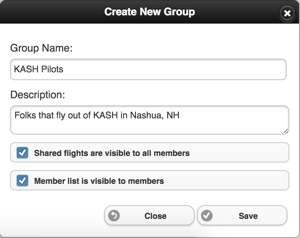
- Select the newly created group, the group details appear. Tap the Invite Members button to invite members to the group.
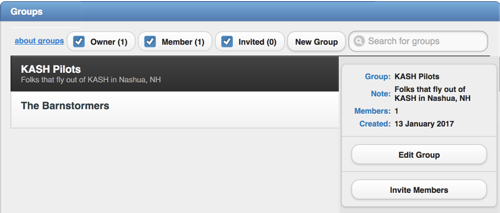
- The invited pilots will see the invitation in their Account tab, and will be able to accept.

Further Reading