Summary
- Creators of web pages: you can embed a debrief of your flight right on the page.
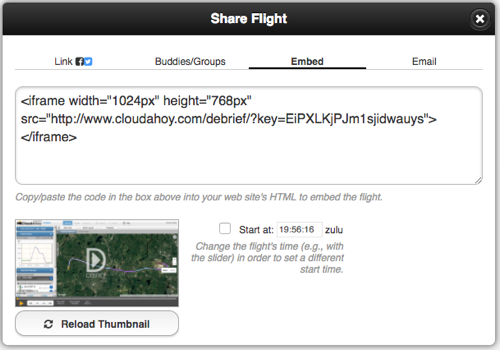
To embed a flight debrief in your web page, you would need to paste an HTML code, generated by CloudAhoy, in the page.
Step by step:
- Debrief the flight.
- Click the “Share Flight” button (on top)
- A dialog opens. Click the “embed” option on top.
- Optionally, check the “Start At” checkbox to have the embedded debrief start at a specific time in the flight.
- Copy the HTML.
- Paste in your page’s HTML, optionally modifying the default width and height.
Alternatively, you can get the embed code from the Flight’s tab’s Share Flight button
.
Further Reading
Pilot / co-pilot (or CFI)
Share a flight in email
Share on your Facebook or Twitter page
Create a flight-share link
Share with a buddy
Share with a group