Summary
- You can send via email a link to a flight.
You can send an email with a flight link. The receivers of this email will get a share link, plus a thumbnail preview of the flight.
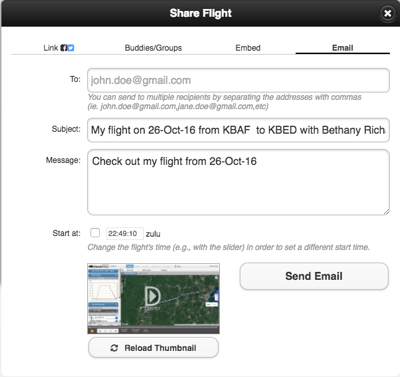 Step by step:
- Debrief the flight.
- Click the “Share” button (on top)
- A dialog opens. Click the “email” option on top.
- Enter one or more email addresses. If more than one, separate then with commas.
- Optionally edit the Subject and Message fields, possibly add specific information about the flight.
- Optionally check the Start at checkbox and use the timeline to set the time in the flight that you’d like the debrief to start when the shared flight is opened.
Alternatively, you can email your flight from the Flight’s tab’s Share Flight button.
Further Reading
Pilot / co-pilot (or CFI)
Share on your Facebook or Twitter page
Create a flight-share link
Embed a flight debrief in a web page
Share with a buddy
Share with a group