Summary
- Review and change your personal information.
- Review and change your subscription status.
- Review and change preferences and aircraft list.
 The Account tab lets you view and change your account details.
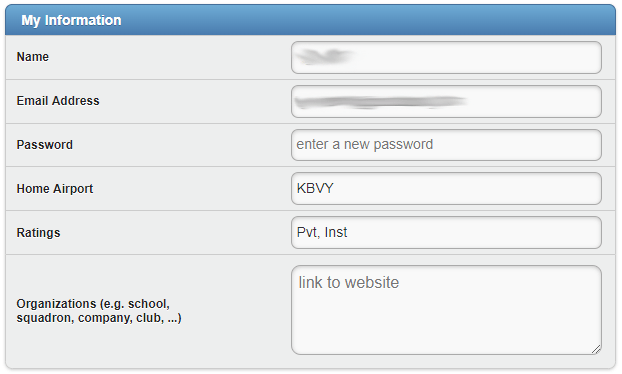
My Information
This section shows you general account information. You can change any of the fields by clicking/tapping them.
Warning
If you modify your account’s email or password, you will also have to logout from the iOS app you’re logged into. Otherwise, the app will not be able to login and upload flights.My Subscription
This section shows your CloudAhoy subscription status, and when it will expire.
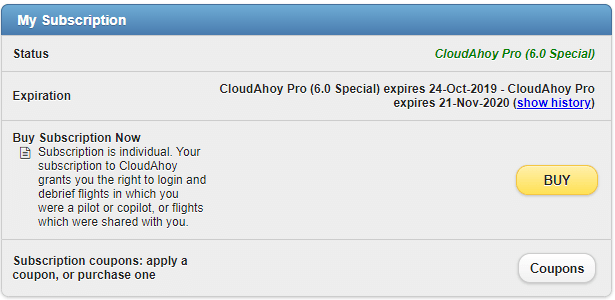
Clicking the show history link will provide you with a detailed log of your status changes.
Clicking the BUY button will provide you details and options for subscription, and will let you use your credit card or PayPal account to purchase a subscription. You can also use this button to upgrade to CloudAhoy Pro.
If you have received a subscription coupon, you can enter it by clicking the Details link.
Gift Coupons
Purchase 12-month subscription gifts! Please send an email to gift@CloudAhoy.com and specify how many coupons you would like to purchaseMy preferences
This section lets you select the speed and altitude units that are used in the Debrief tab.
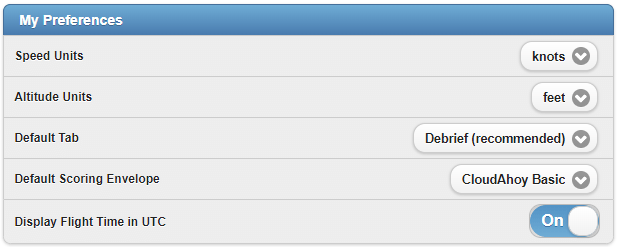
The Default Tab option lets you choose to start on either the Debrief tab or Flights tab after logging in to CloudAhoy.
The Default Scoring Envelope option let’s you change how CFI Assistant scores your segments by default.
Finally, you can choose to display flight times in UTC.
My Aircraft
This sections lists all the aircraft used by you.
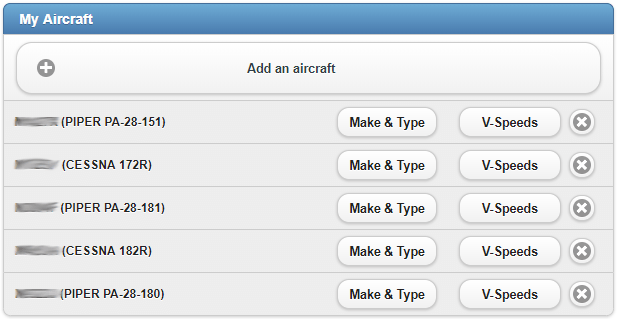
The list is updated automatically each time you use a new tail number. Each aircraft can be deleted from the list.
For fixed-wing aircraft you can edit the V-Speed. See this.
You can also manually add an aircraft which will allow it to appear in the aircraft list on your CloudAhoy app.
You can edit the make/type of each aircraft, unless the information was automatically loaded by CloudAhoy from an official registry.
My Integrations
Manage your third party integrations, such as LogTen Pro X, using this section.

Buddies

See Editing your Buddies list
Groups

See Editing Groups membership