Summary
- Automatic scoring – performance assessment
- CFI Assistant scores are visible in the Debrief tab and in the Flights tab
- Criteria for scoring are configurable via Envelope Editor
- Part of CloudAhoy PRO subscription level
Important: Accuracy - GPS, and V-Speeds
The CFI Assistant works well if the data it analyzes has high accuracy. For this the following two things are important:1 – High accuracy GPS: t is highly recommended to use an external GPS. If available – import data that includes AHRS, such as from Stratus, Sentry or Garmin G1000.
Using the internal GPS in phones and tables is ok but you should take into account that the scoring by the CFI Assistant might have some margin of inaccuracy.
2 – V-Speeds: It is important that CloudAhoy knows the V-Speeds for aircraft flown, please make sure that this is the case. See the “V-Speed” section in the Help.
About CFI Assistant
CFI Assistant is providing a score which reflects on the performance of the pilot when executing a specific maneuver: approaches (IFR and VFR), and the other maneuvers which are recognized by CloudAhoy.
The CFI Assistant certainly does not replace a human CFI. Human CFIs are indispensable. There is much more to flying than staying on a glide slope or keeping an altitude, which what the CFI Assistant can evaluate! However, there are certain aspects of pilot performance and proficiency which are objective and measurable, and that’s where the CFI Assistant comes in.
If you are a flight instructor, the CFI Assistant can help you discuss and emphasize points that were highlighted during the flight.
If you are a student pilot, the CFI Assistant can help you relive the flight and combine the CloudAhoy scoring with what your instructor discussed with you in flight, or what you remember from a solo flight.
If you are a seasoned pilot, the CFI Assistant provides a feedback about how well you have flown; often during the flight you are too busy flying the plane and have less time for self-criticism. The CFI Assistant can also help understand the circumstances around something unexpected that may have happened.
For everybody flying an aircraft – debrief is always an important part of learning and improving, the CFI Assistant can assist with that.
Feedback is always welcome by CloudAhoy, and for CFI Assistant especially so! See the Feedback section below.
CFI Assistant in the Debrief Tab
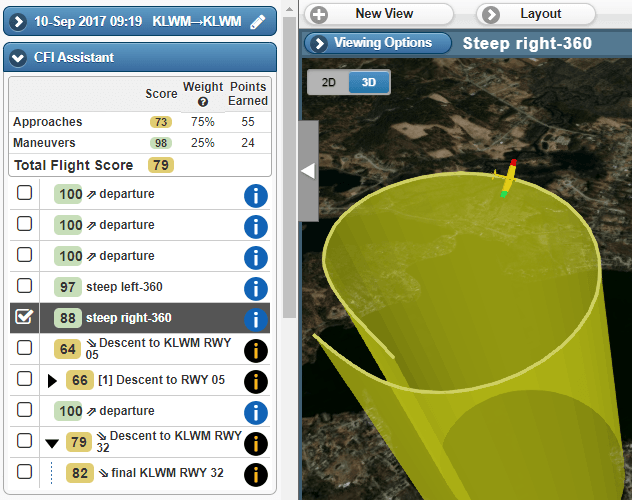
The CFI Assistant panel on the left displays the scores of each scored segment (including hierarchical segments). You can declutter and display the segment information from this panel, as well as from the Segment Manager panel. The panel shows individual segments’ scores as well as the flight’s overall weighted score.
CFI Assistant in the Flights Tab
In CloudAhoy PRO there are two important additions compared to CloudAhoy Standard.
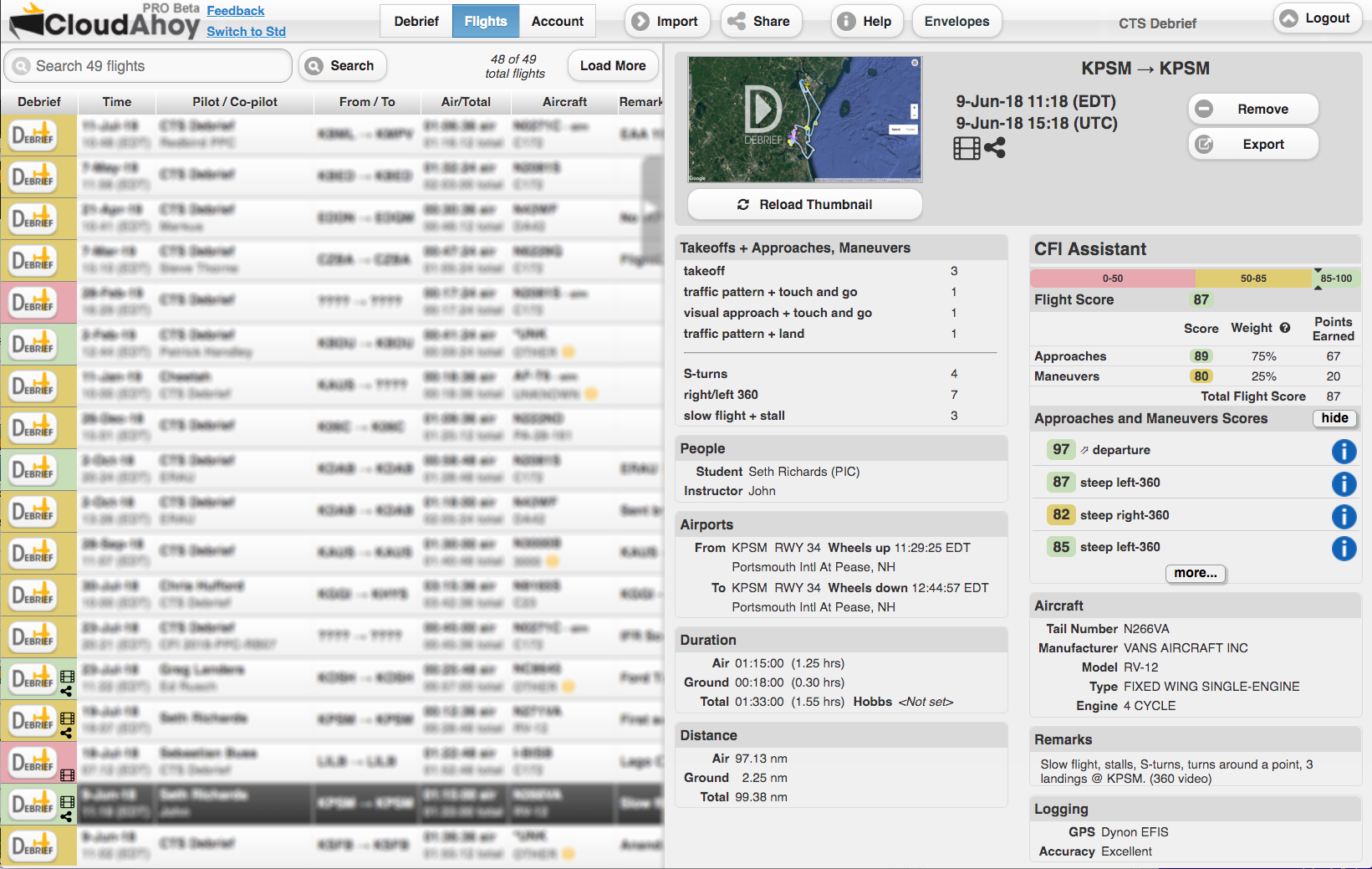
- The “Debrief” buttons have colors, indicating the overall score assigned by the CFI Assistant to the flight.
- The “CFI Assistant” panel displays the scored segments and includes info button for immediate debrief of selected segments.
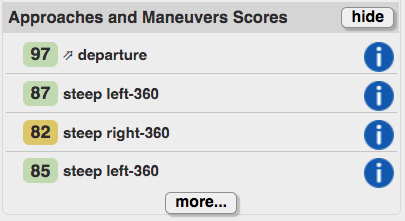
CFI Assistant for VFR Stabilized Approaches
In most cases, CloudAhoy will build a segment hierarchy for each of the approaches listed by the CFI Assistant, including the entire approach and the Final. You can debrief the entire approach by clicking its “info” button:  . You can also open any approach hierarchy by clicking the ► symbol, and debrief only the Final.
In the screenshot below, a user clicked the “info” button of the entire visual descent to RWY 19:
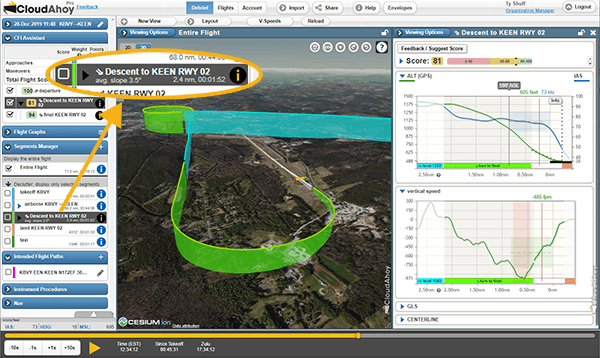
The segment information window for a visual approach displays 4 graphs, which you can opened or closed individually. In the screenshot above, the user opened the ALT/IAS and Vertical Speed graphs, and kept the Glide Slope and the Centerline Deviation graphs closed.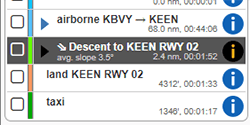
This specific descent is very long, and it would be beneficial to open only the Final’s segment info, as seen on the right. The score for the approach was 75. Opening the Score section (by clicking the ► symbol to the left of Score) shows the following table:
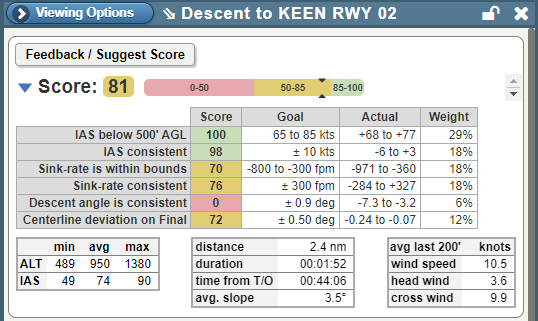
The table lists 6 criteria used for evaluating the approach. Each row lists the goal, the actual, and the score for the item. The goals and weights are specified in the scoring envelope. The weight is used to compute the overall score, 81 in this case.
The goals are computed from the aircraft V-Speeds, and from the Envelope.
The visual approach scoring starts at 500′ AGL.
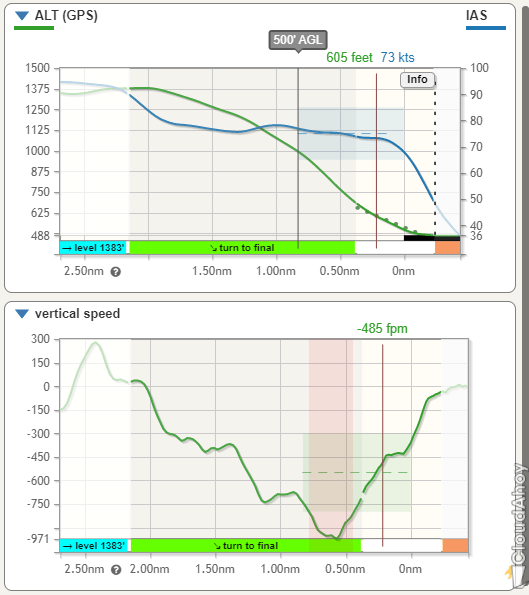
Each of the four graphs displays a shaded horizontal rectangle with a dashed line, representing the recommended value of the entity and the +/- tolerances. The rectangles cover the area between 500′ AGL and the threshold. In the example below,
- The ALT/IAS graph show a recommended IAS of 75 knots and no more than +/- 10 knots difference.
- The Vertical Speed graph shows a recommended VS of -550 f/m, and allowable range of -800 to -300.
The CFI Assistant highlights in pink when the pilot performance is outside of these ranges. The airspeeds was kept within the recommended range, but the vertical speed did not.
The X axis shows the distance to the runway threshold.
CFI Assistant for Instrument Approaches
The CFI Assistant for instrument approaches is very similar to that of the visual approaches. The main differences:
- The Instrument Approach’s stability criteria start at 1000′ AGL.
- The CFI Assistant checks the the altitudes during the approach, compares them to he minima, and assigns score accordingly.
- The envelope of the instrument approach is different from the visual’s. It is more tight.
The following shows the scoring of an RNAV approach (KASH RNAV RWY 32):
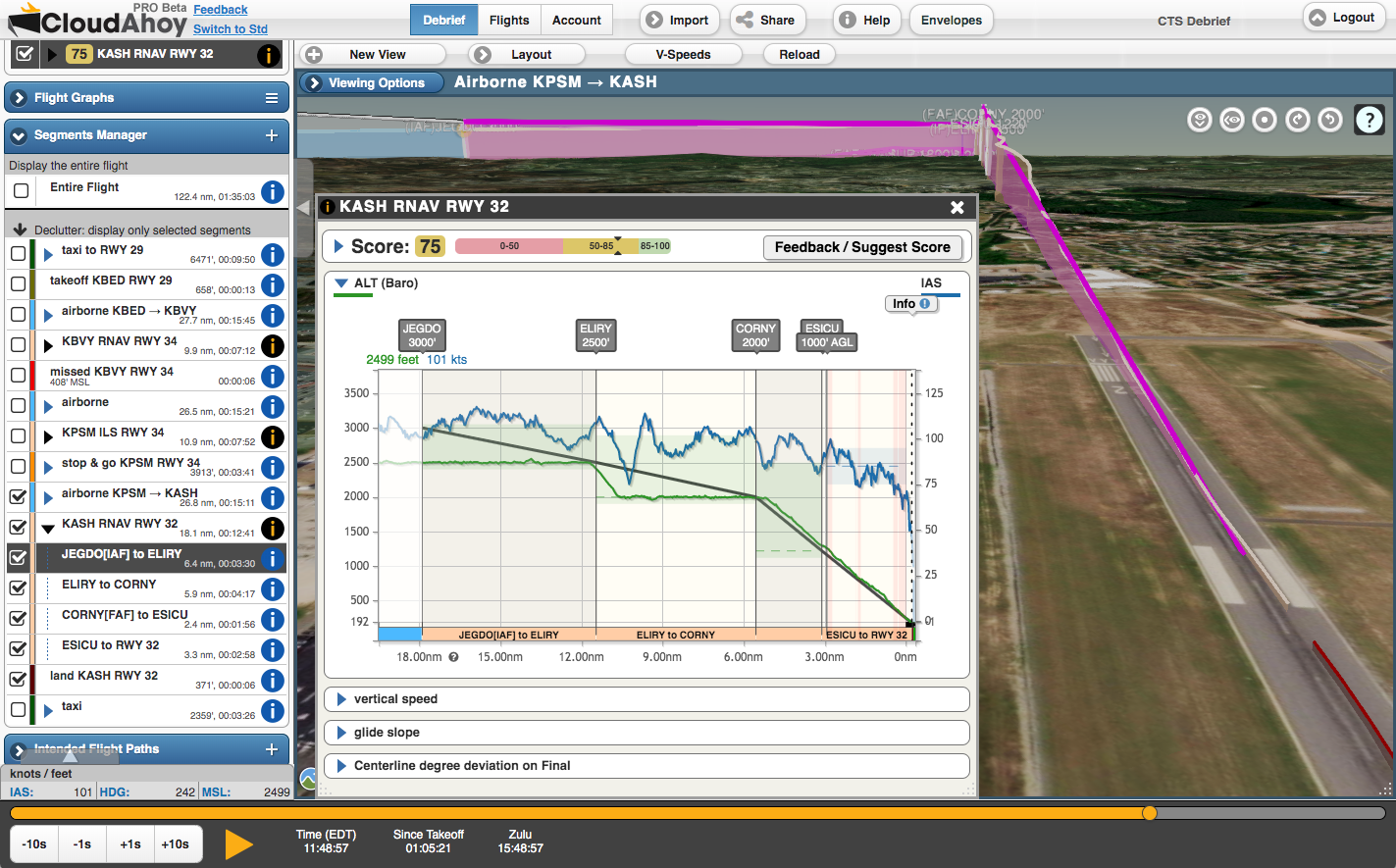 As for the visual approach, there are four graphs with annotations here as well.
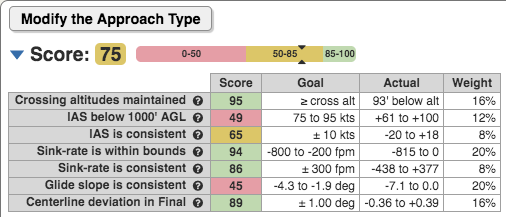
This is the score table. The first entry has the score of maintaining altitude above minimums.
 This is the altitude graph:
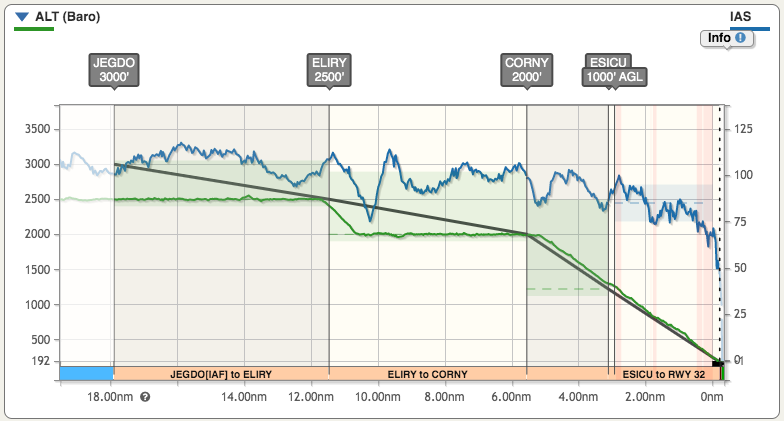
Important aspects of the graph:
- The solid black line represents the published vertical path. It’s the line seen in the approach plate’s Profile View.
- The waypoints are annotated on top, just like in the approach plate’s Profile View.
- The shaded green area represents the allowed altitude. The dashed line shows the minimum (for example, 2000′ between ELIRY and CORNY). The green rectangle extends 100′ below the minimum, representing the lower bound. If the altitude drops below this lower bound, the entire score is set to 0.
- The shaded blue rectangle represents the recommended approach airspeed in the last 1000′.
- Note the annotation of the legs of the approach, for example “JEGDO[IAF] to ELIRY”.
CFI Assistant for Departure
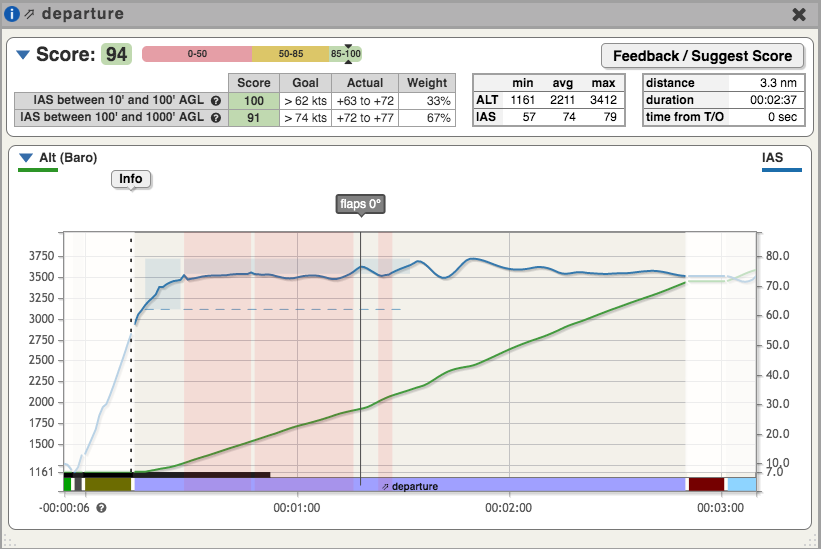
Clicking the “info” button:  on a departure segment displays the CFI Assistant for it.
The CFI Assistant requires maintaining airspeed of at least Vx for the altitudes 10′-100′, and Vy until 1000′ – all within tolerances as defined in the Envelope. The 100′-1000′ AGL range allows for speeds below Vv, but if at any point during the departure the speed drops below Vx, the CFI Assistant assigns a score of 0.
In the screenshot below, the CFI Assistant displayed shaded a dashed line at Vx, where the airspeed must always be above. It displays the shaded areas of recommended minimum airspeed. In the example, the pilot flew very close to Vy, but often slightly below. The score for the 100-1000′ AGL range was still high, because the points outside the envelope were very small.
CFI Assistant for 360-Degree Turns
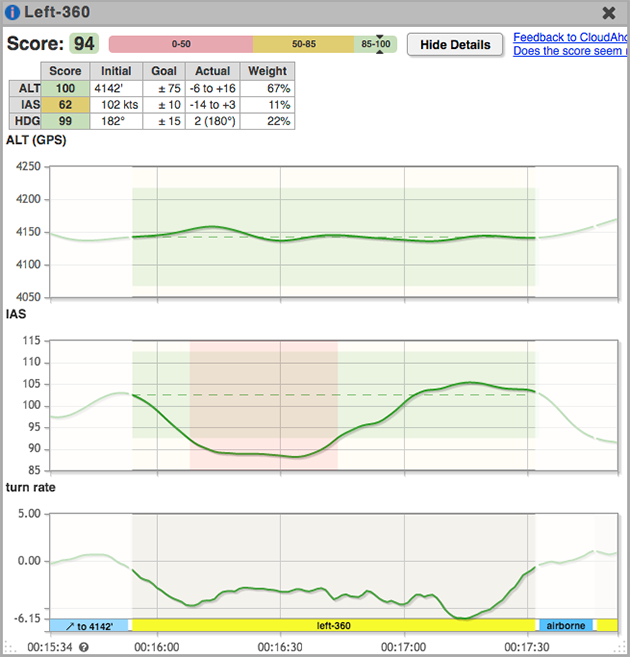
Clicking the “info” button: on a turn segment displays the CFI Assistant for turns. The CFI Assistant scores the manuever according to how the initial airspeed and altitude are maintained. The green rectangles denote the permissible range of each parameter as defined in the envelope. The pink stripes, if any, show deviation from the range.
In addition to airspeed and altitude, the CFI Assistant also compares and grades the initial and the final heading.
If AHRS data is available, the CFI Assistant also scores the consistency of the bank angle.
CFI Assistant for S-Turns
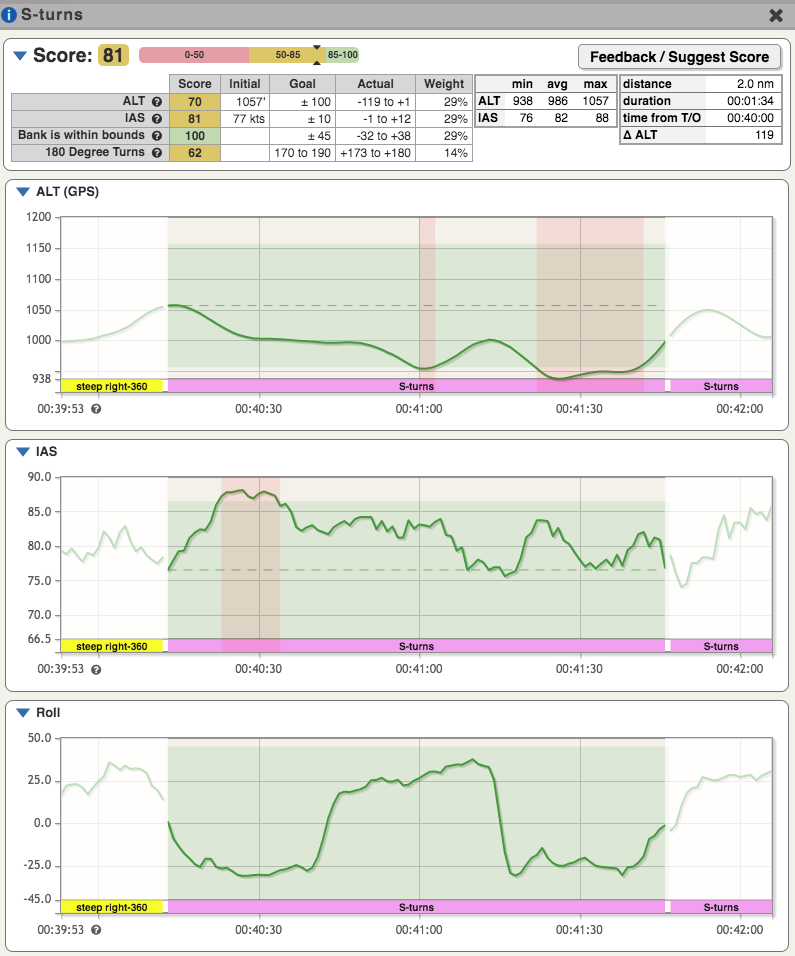
Clicking the “info” button: on an S-turn segment displays the CFI Assistant for S-turns. The CFI Assistant requires maintaining altitude and airspeed, keeping banks below 45 degrees, and requiring that each turn is 180 degrees – all within tolerances as defined in the Envelope.
CFI Assistant for Commercial Steep Spirals
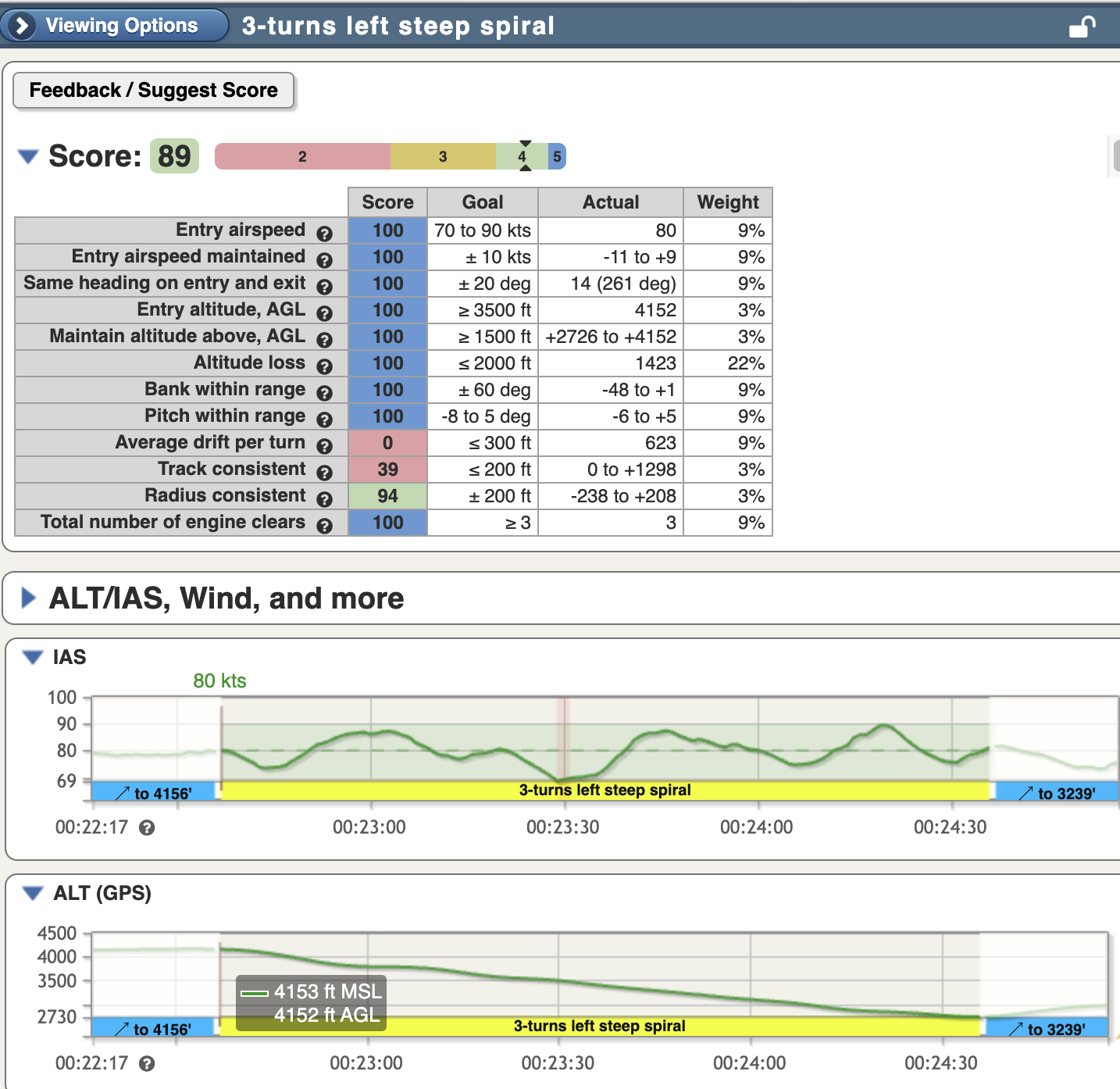
As of the November 2024 release, CloudAhoy support the detection and scoring of the commercial pilot steep spiral maneuver.
These graders assist in assessing maneuver performance relative to the commercial pilot ACS as well as other common procedures such as engine clearing (if the flight was recorded with engine data available, such as with a G1000) on each complete turn.
The Average drift per turn, Track consistent, and Radius consistent graders together measure the quality of turns:
- Track consistent measures how closely each successive turn follows the track of the turn before it
- Average drift per turn assesses how much a calculated “center” of each turn varies between loops and can be useful to determine how much the maneuver was influenced by wind drift
Desired entry airspeed for the maneuver can be configured per aircraft for organizations in the Aircraft tab of CloudAhoy Organization Manager under the Parameters for Commercial Maneuvers section. When an aircraft-specific entry airspeed is specified, the Envelope Editor is used to configure your desired tolerances relative to the entry airspeed. For example, you may specify an 80KT entry airspeed, and then allow for a +/- 5KT tolerance. For individual users who are not part of an organization, the desired entry airspeed range can be configured directly in the Envelope Editor.
The following graders for this maneuver have specific data requirements and are not usable when debriefing a track log with only a GPS data source:
- Total number of engine clears – requires engine data, such as from a G1000
- Bank within range – requires AHRS (such as a ForeFlight track log recorded with a Sentry) or avionics-provided bank data
- Pitch within range – requires AHRS (such as a ForeFlight track log recorded with a Sentry)or avionics-provided pitch data
CFI Assistant for Commercial Chandelles
CloudAhoy will detect the commercial chandelle maneuver and calculate a score for it in the CFI Assistant pane.
The CFI Assistant graders for a chandelle maneuver measure key aspects of the maneuver based on ACS requirements and other aspects developed in consultation with professional CFIs.
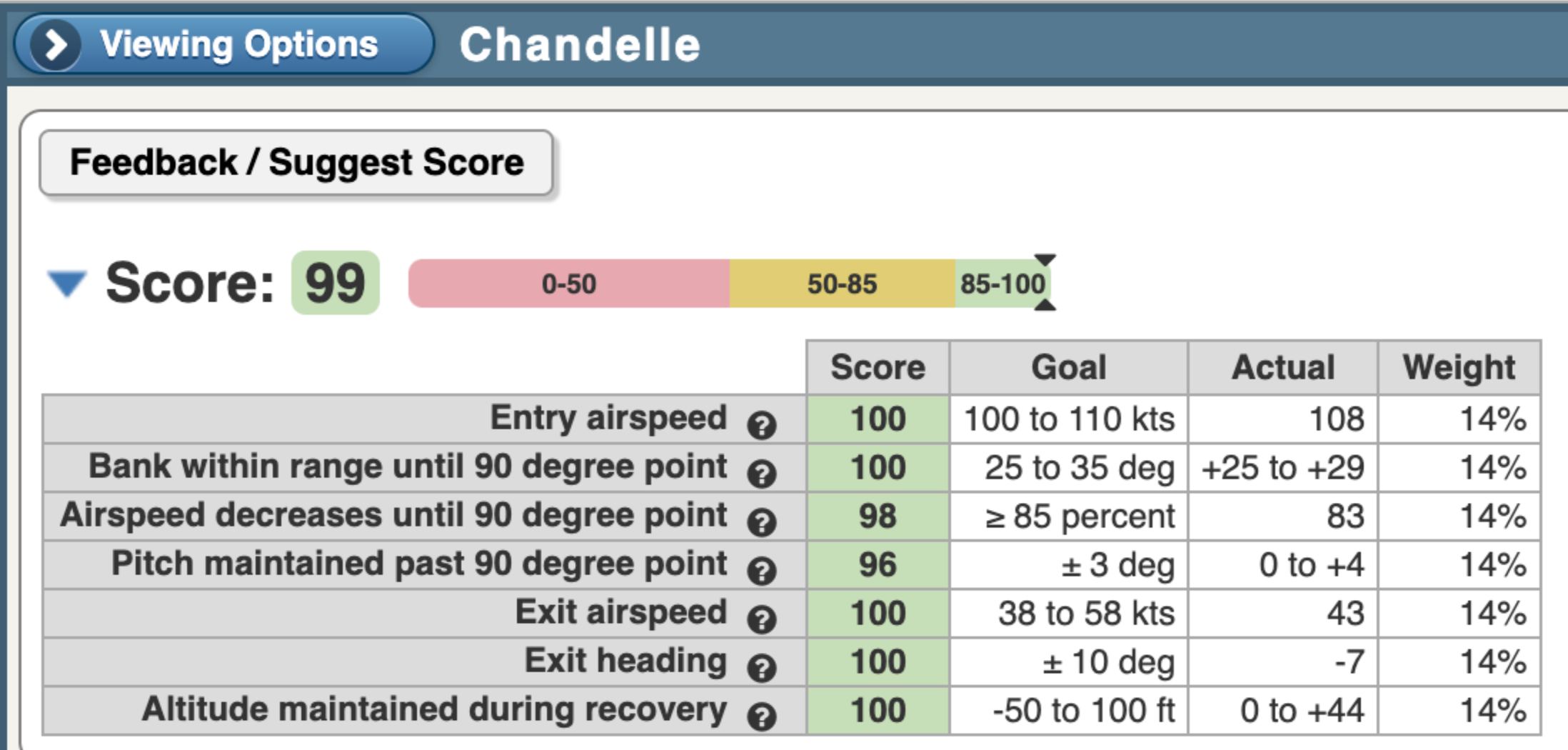
Additional detail about some of the graders used for chandelles:
-
The desired “Entry airspeed” range may be configured in the Envelope Editor
-
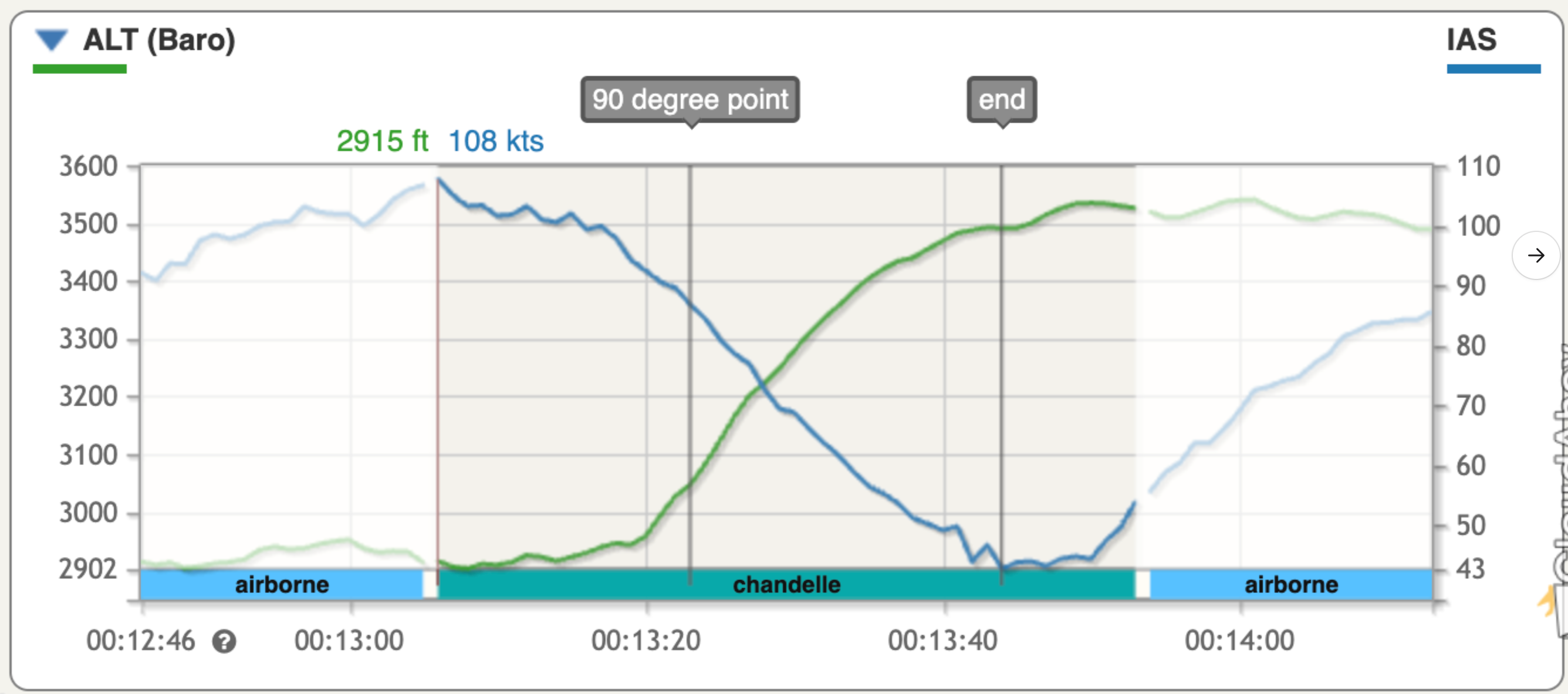
The “Airspeed decrease until 90 degree point” measures the percentage of time during the first 90 degrees of turn that airspeed decrease is detected. You can set this to be a higher or lower percentage depending on the extent to which you want to grade smoothness of airspeed loss in the first half of the maneuver.
-
“Exit airspeed” is measured relative to the configured Vs1 speed of the aircraft
-
“Exit heading” is measured relative to the detected entry heading. You can specify a tolerance for how precisely you wish to ensure the maneuver ends at exactly 180 degrees opposite the entry heading.
-
“Altitude maintained during recovery” measures steadiness of altitude in the final 7 seconds of the maneuver, to measure the stability of recovery and whether or not the pilot held altitude steadily
As with other maneuvers, you can configure various parameters and tolerances for these graders in Envelope Editor.
The following graders for this maneuver require high sample-rate AHRS data, such as from G1000 avionics, and therefore are not usable when debriefing a track log with a GPS-only or Sentry-based data source:
-
Bank within range until 90 degree point
-
Pitch maintained past 90 degree point
The following visualization includes markers that denote the 90 degree point and the end of the maneuver in order to help you visualize airspeed and altitude at those points:
CFI Assistant for Traffic Patterns
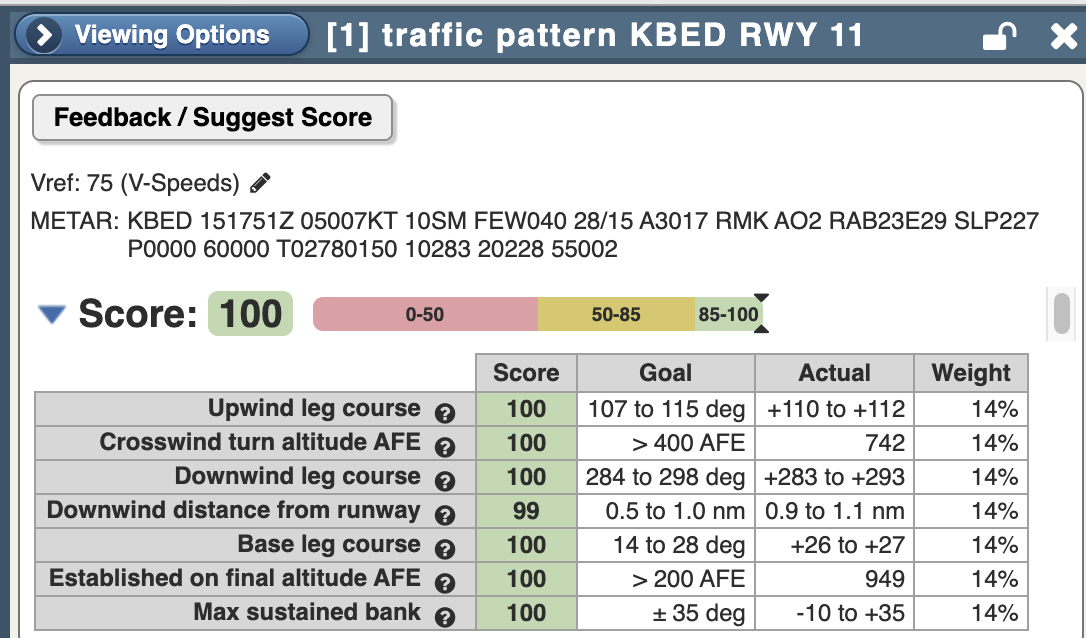
As of the October 2025 release, CloudAhoy will detect and score traffic patterns in the CFI Assistant.
Note: CloudAhoy will detect only full circuits around a traffic pattern at this time. Full circuits are defined as traffic patterns that have full upwind, crosswind, downwind, base, and final legs.
Traffic patterns have the following selection of graders which are designed to assess important aspects of traffic pattern flight. The grader thresholds and weights can be adjusted in the Envelope Editor.
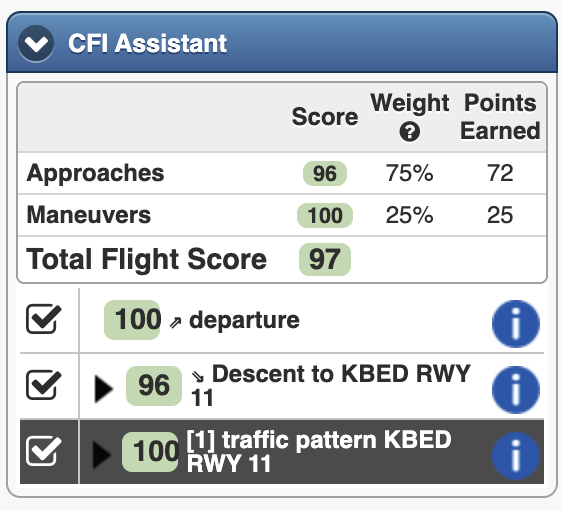
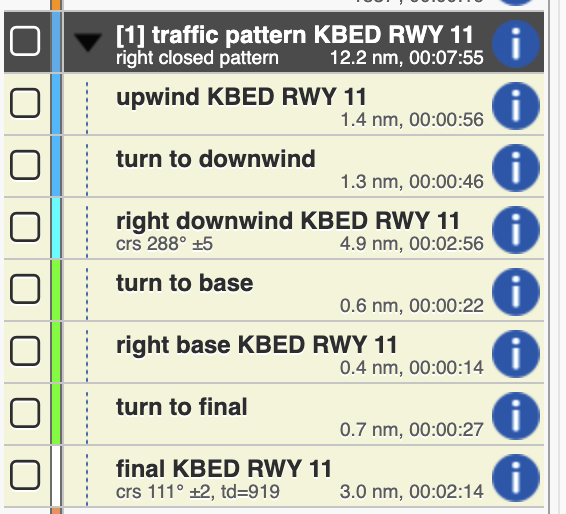
Traffic patterns will also appear in the maneuver list and in the segments manager:
The envelope editor
The parameters used by the CFI Assistant can be edited with the Envelope Editor. It is invoked from https://www.cloudahoy.com/envelopes
Feedback
* The CFI Assistant operates on all the flights which are already in your Flight tab. *
If you have feedback on the score you were given please click on the Feedback / Suggest Score button.
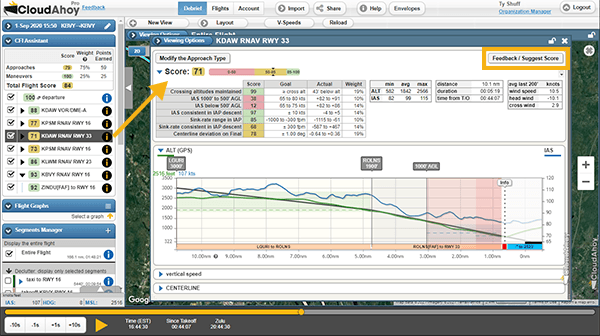
Click or tap the Feedback button to get the short form: