Summary
Welcome to ForeFlight Flight Data Analysis (FDA)
Formerly CloudAhoy P-FOQA
This page contains release notes.
Questions? Feedback? team@cloudahoy.com
Feedback and Suggestion
Any feedback is welcome! Click the Feedback button, or send email to team@cloudahoy.com

Release Notes
December 2025
Traffic pattern detection and scoring
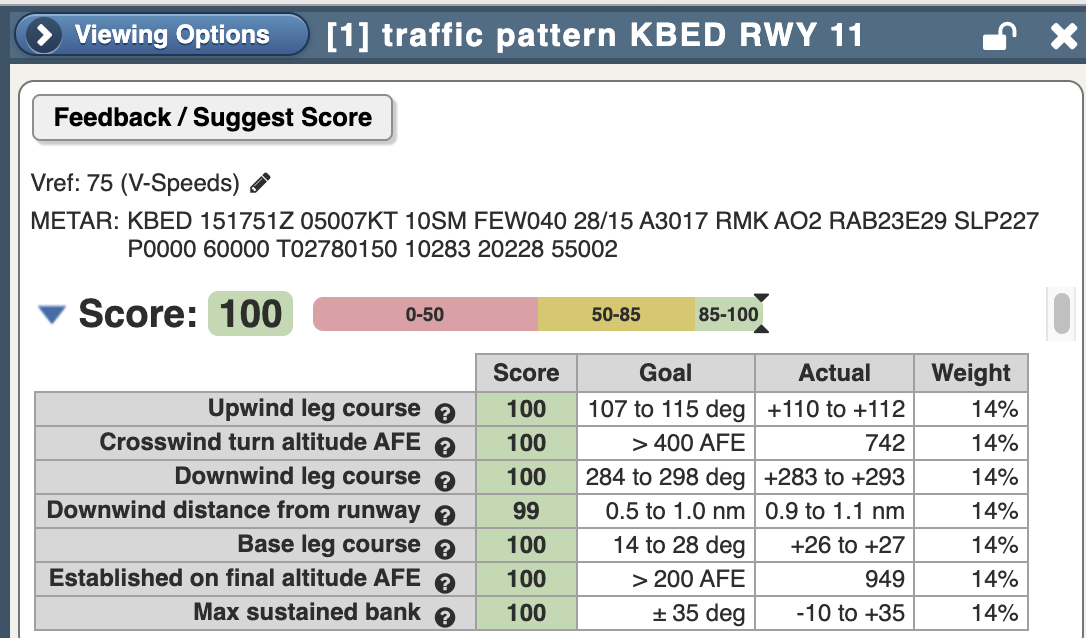
CloudAhoy will detect and score traffic patterns with a new dedicated set of graders in the CFI Assistant. For more information, please refer to the CFI Assistant for Traffic Patterns section of the CFI Assistant documentation page.
July 2025
View trends for individual exceedances
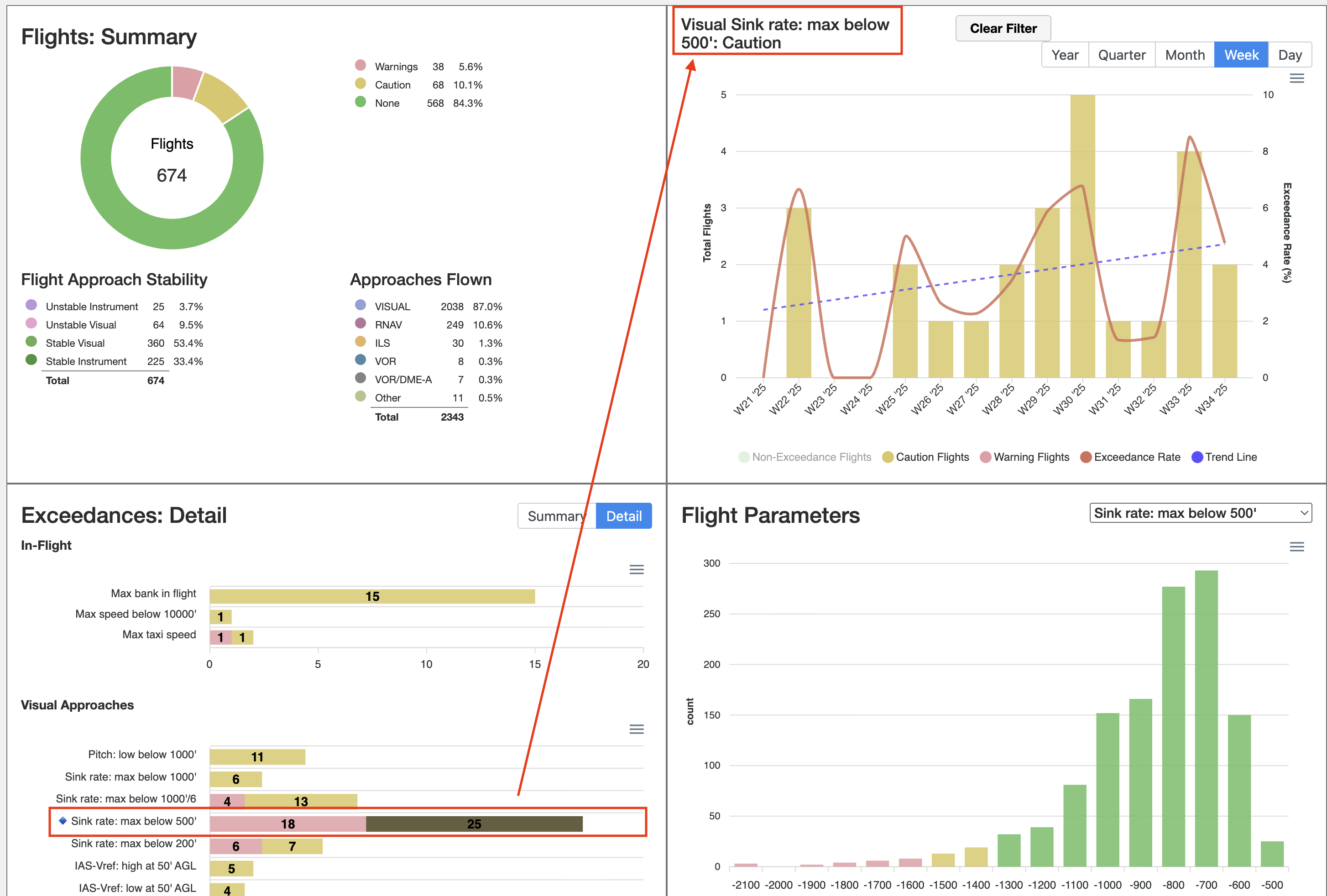
In March, we added the ability to view exceedance trends over time in the FDA dashboard. This allows customers to view trends for all exceedance activity. As an enhancement to this capability, we have introduced an additional feature that allows dashboard users to further filter the trend graph to a specific exceedance. This allows customers to answer questions like “How is my organization trending with exceedances of ‘maximum sink rate below 500 feet’?” or for any other specific exceedance you choose.
To use this feature, select any specific exceedance from the Exceedances: Detail pane as shown below. A blue diamond will appear to indicate that the dashboard data is being filtered by that specifically chosen exceedance. The heading of the trend chart at the top right of the dashboard will update to indicate that the data being shown is filtered. Click the Clear Filter button to return the dashboard to its default, non-filtered state.
June 2025
Improved exceedance review (approval) workflow
In response to customer feedback, we have made the following improvement to the exceedance review workflow (formerly referred to as the Approval process):
-
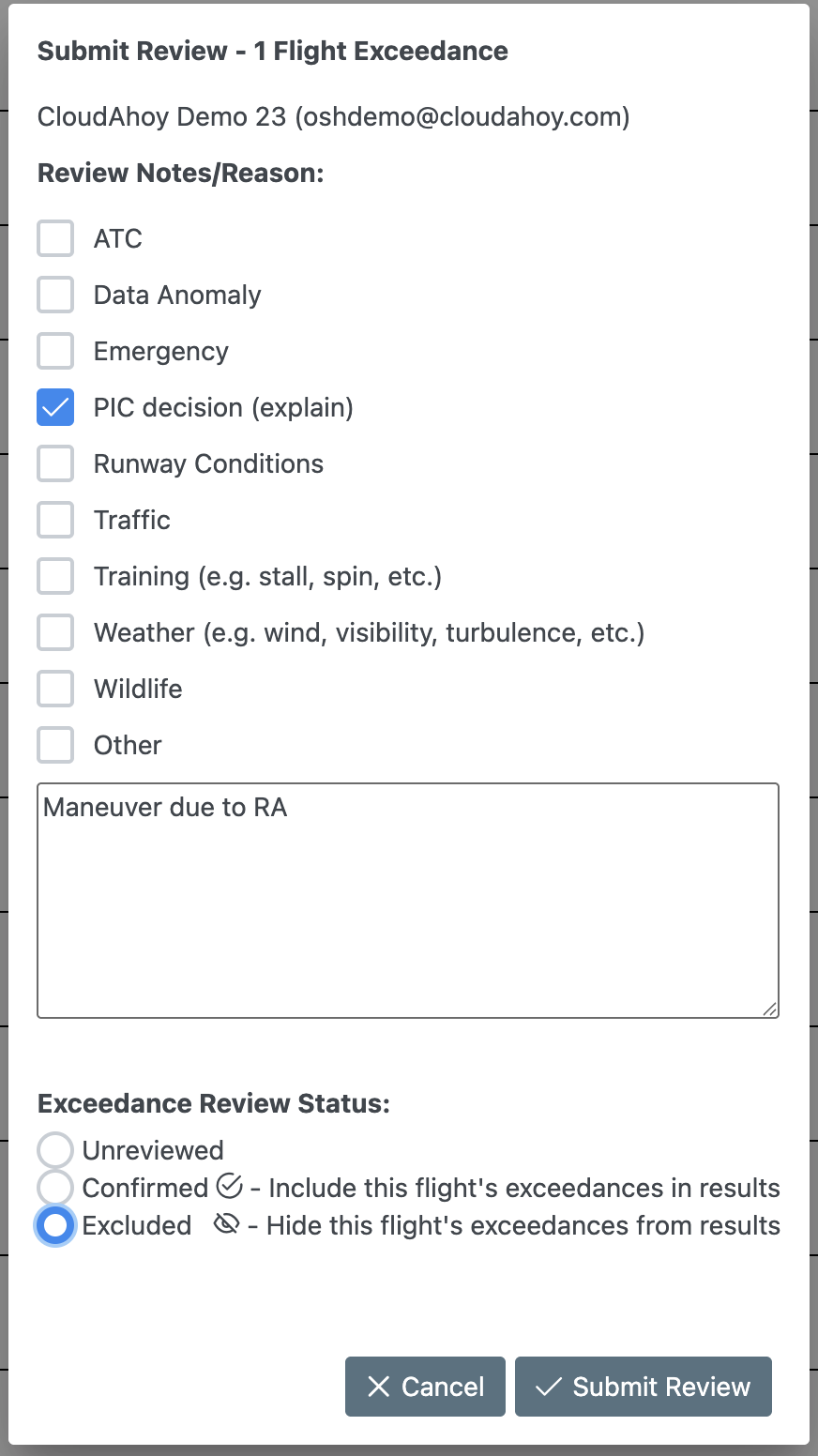
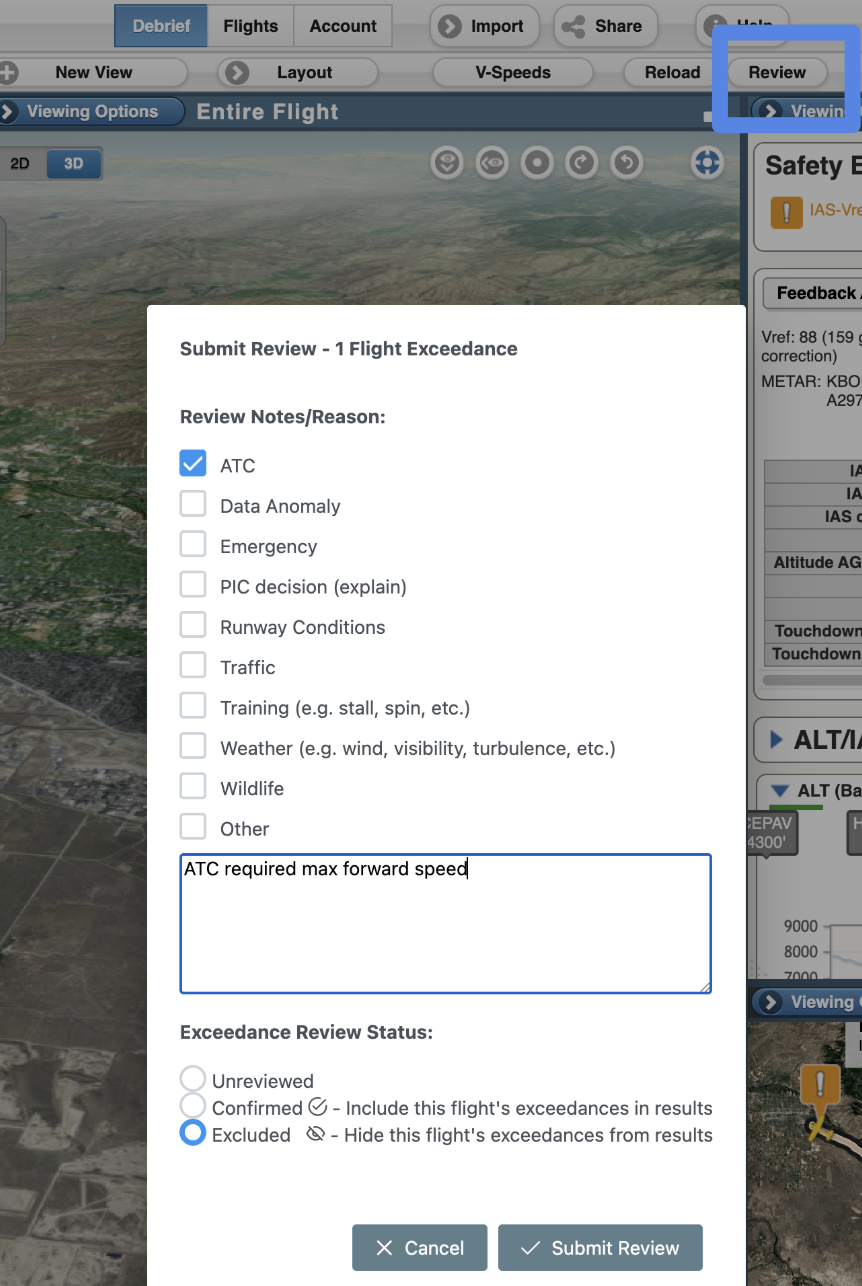
Renamed the “Approved” state to “Excluded” – this is the state that should be used if an exceedance flight is deemed to have been a false positive that you wish to exclude from data in the FDA dashboard. All previously “Approved” exceedance flights will be migrated to “Excluded.”
-
Introduced new “Confirmed” state – for customers who wish to denote that an exceedance flight was reviewed and confirmed to be a valid exceedance, a new “Confirmed” state was added.
-
Introduced new “Unreviewed” state – for customers whose internal processes require that each exceedance flight be reviewed and either “Confirmed” as a legitimate exceedance, or “Excluded” as a false positive, the “Unreviewed” state makes it easy for analysts to see a list of exceedance flights that have not yet been examined.
-
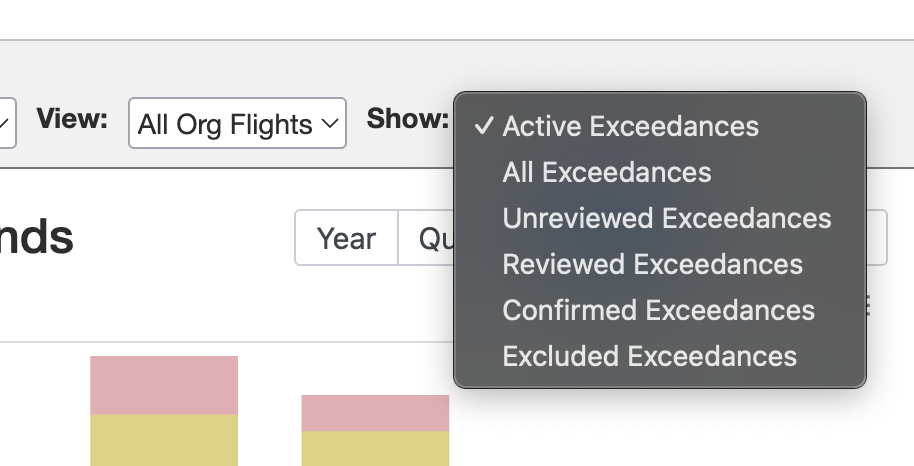
New filters – for each of the new states, you can select a filter to focus FDA dashboard content just on the states you wish to see
-
Review exceedances within the debrief view – When opening an exceedance flight in in the debrief view by clicking on it in the FDA dashboard, there is a “Review” button that lets reviewers comment and set status on exceedance flights without jumping between tabs.
-
The FDA role required to perform a review has been renamed to “Exceedance Review” from “Flight Approve.” The “Exceedance Review” role is required to perform any actions related to reviewing or setting statuses on exceedance flights.
April 2025
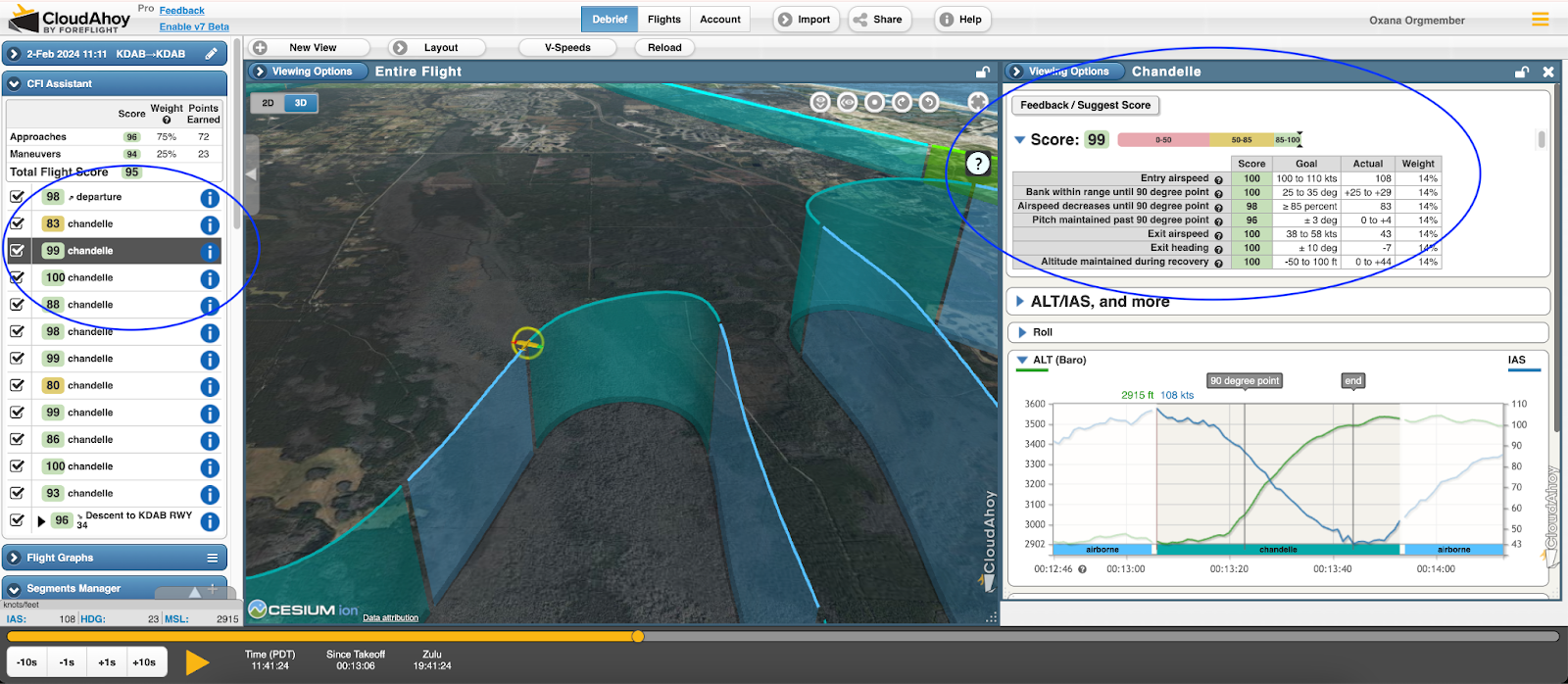
Chandelle maneuver detection and scoring
We have further enhanced CloudAhoy Debrief to help students and instructors who are training on commercial maneuvers. Chandelle maneuvers are now detected and presented in the segment manager, and are scored in the CFI Assistant using a new set of maneuver-specific graders:
March 2025
View exceedances trends over time in the FDA dashboard
The chart in the top-right quadrant of the FDA dashboard has been improved with information about exceedances trends and rates over time. The following capabilities have been added:
- Linear trend line – For the selected time period, a linear trend line (a blue dashed line) allows users to quickly see whether total exceedance occurrences are trending up or down.
- Exceedance rate information – A secondary Y-axis has been added to the right of the chart which depicts the rate of exceedances as a percentage of total exceedances per flight flown. This is shown on the chart as a red solid line.
- Configurable time intervals – Users may choose between Year, Quarter, Month, Week, and Day time intervals. This controls which time spans appear in the X-axis of the chart. Please note, there is currently a 99 interval limitation on the chart. So, for example, the X-axis will only show 99 days, weeks, etc at a time.
- Additional info in mouseover dialog – Mouse over a bar in the chart for specific counts of warning, caution, and other exceedance data for that time span.

January 2025
Ground engine operations exceedance and parameters
For FDA customers who use a data source that provides engine information (for example, a Garmin G1000), we have added additional data points to allow customers to measure and identify whether their piston aircraft are being operated efficiently on the ground. Users can visualize these new data points in the Flight Parameters chart in the FDA dashboard, and can configure exceedances for desired thresholds for alerting. The following data points were added:
- Time from engine startup to first taxi movement
- Time from first taxi movement to engine run-up
- Time from the conclusion of the engine run-up to takeoff
- Total time between engine start and takeoff

December 2024
Filter FDA dashboard data to only your own flights
Users who sign into the FDA dashboard now have an option to filter the data to just flights their own flights, as opposed to the default view which shows data for all members of the organization. Look for the “View” dropdown above the “Flights and Exceedances” chart to apply this filter.

November 2024
Steep spiral commercial maneuver detection and grading
For students and instructors who are training on commercial maneuvers, CloudAhoy Debrief now supports the detection and scoring of the steep spiral maneuver. Users will see steep spirals detected as a maneuver in the segment explorer, and will see a set of new graders for the maneuver in CFI Assistant:

August 2024
CloudAhoy Debrief integration with ForeFlight Runway Analysis
When grading and assessing an approach, CloudAhoy uses a VRef speed to determine at what airspeed an approach should be flown. There are several possible ways that CloudAhoy can determine the VRef to use. For customers of both CloudAhoy and ForeFlight Runway Analysis, customers can now have their approach VRef sourced from Runway Analysis for increased accuracy.

First release Mar-2, 2023
Release announcement March 2, 2023
In April-2023 CloudAhoy became part of ForeFlight
Jan-12, 2023 (Beta)
- Stable Approach
- Mark a flight with exeedance as “OK” after
Nov-9, 2022 (Beta)
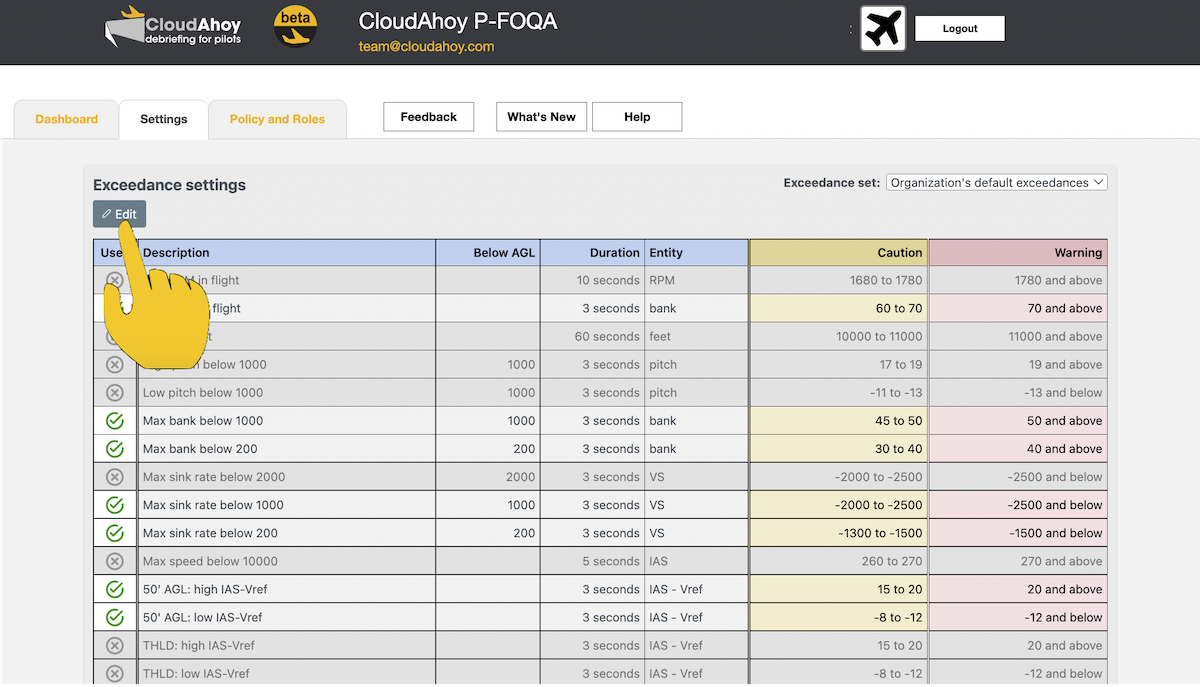
- Per-org Setting tab: ability to create an org-wide Setting
For details see https://help.cloudahoy.com/fda/fda-settings-tab/
Sep-22, 2022 (Beta)
Highlights:
- Additional permission setting: ability to give users access to the P-FOQA Dashboard, without seeing the Flights list, and without being able to debrief any flights via the P-FOQA Dashboard.
Note that those permissions are hierarchical:
– ‘Flight List’ permission becomes clickable only when the P-FOQA permission is on
– ‘Flight Debrief’ permission becomes clickable only when the ‘Flight List’ permission is on
The indentation reflects this hierarchy.
P-FOQA permission are –
1. This user can access the P-FOQA Dashboard, but when clicking on any of the bars the list of flights which includes those exceedances will not show up.
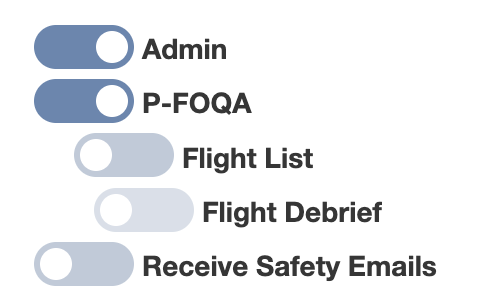
2. This user will be able to see the list of flights which contain exeedance but will not be able to debrief any flight in the list shown in the P-FOQADashboard.
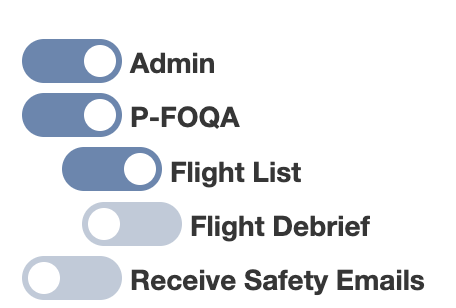
3. This user can access the the P-FOQA Dashboard, see the list of flights with exceedances, and debrief them.
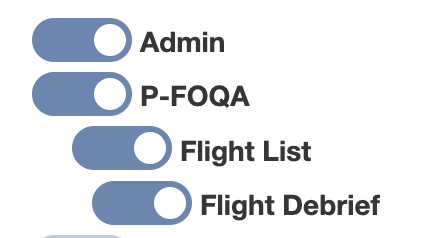
These permissions when used are also visible in the Roles and Policies tab.
(Note: this feature was added per request of CJP, who would like to give access to the Dashboard to all their members, while hiding details of specific flight, to protect privacy.)
Sep-14, 2022 (Beta)
Highlights
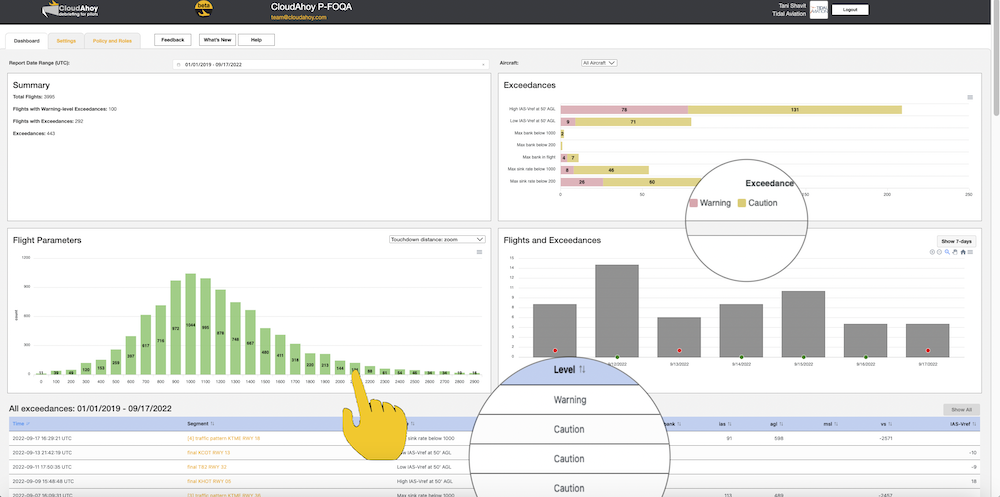
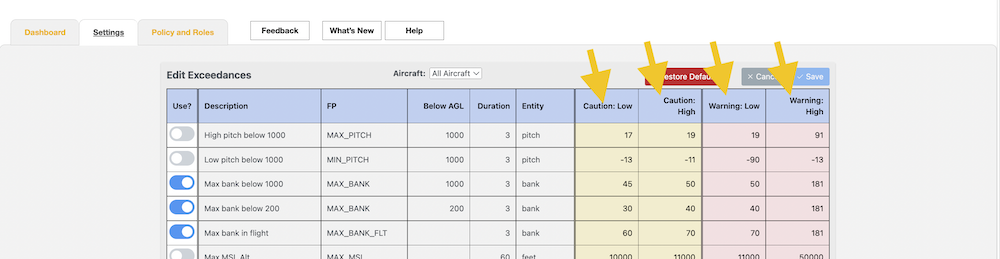
- Terminology change: level of exceedances is now is now “Warning” and “Caution” (was “Critical” and “Warning”)
- Histogram in the dashboard: each bar is now clickable
- Note: sometimes the bar is very low and it’s difficult to click on – it might be a usability issue, we will look to improve in next releases.
Sep-1, 2022 (Beta)
Highlights
- Enable email to designated people when a Safety Event (Exeedance) was detected
Details
> NEW: email to designated people when a Safety Event (Exeedance) was detected
Aa admin can enable members of the organization to receive an email when a safety event is detected, i.e. when there is an exeedance. The email will be send shortly after the flight is uploaded into CloudAhoy.
Step by step :
- Login https://www.cloudahoy.com/organization/
- Note that you must be an Admin of the organization
- Go to the People tab
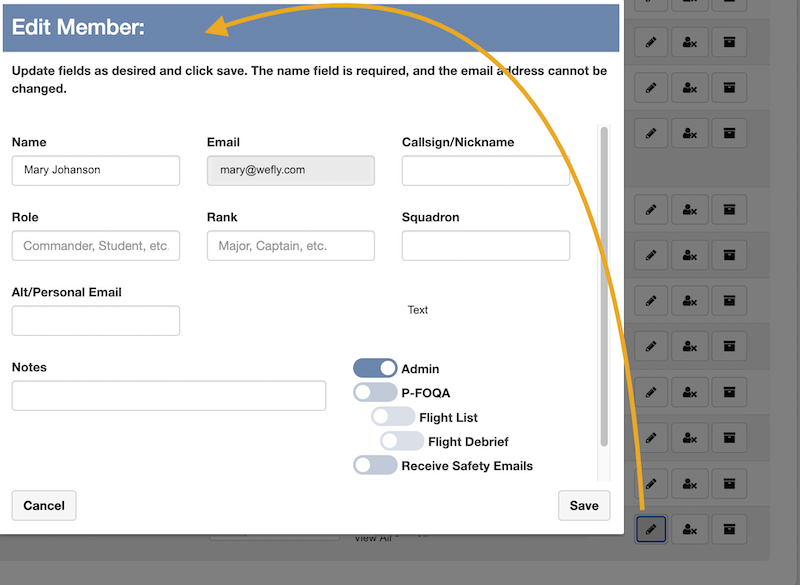
- For the specific person, click on the Edit icon (see screenshot below)
- Turn on the “Receive Safety Email” switch (see screenshot below)
- Click “Save”
Repeat that for each of the people you would like to receive emails when a safety event is detected.
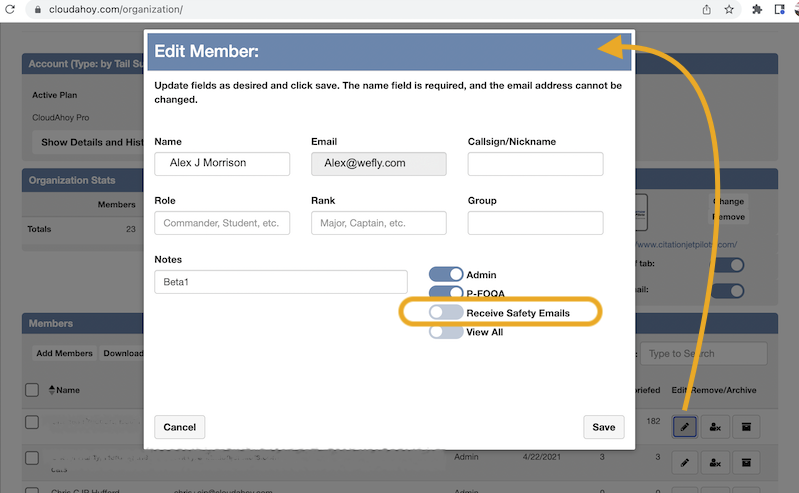
Click on the ‘Edit’ icon
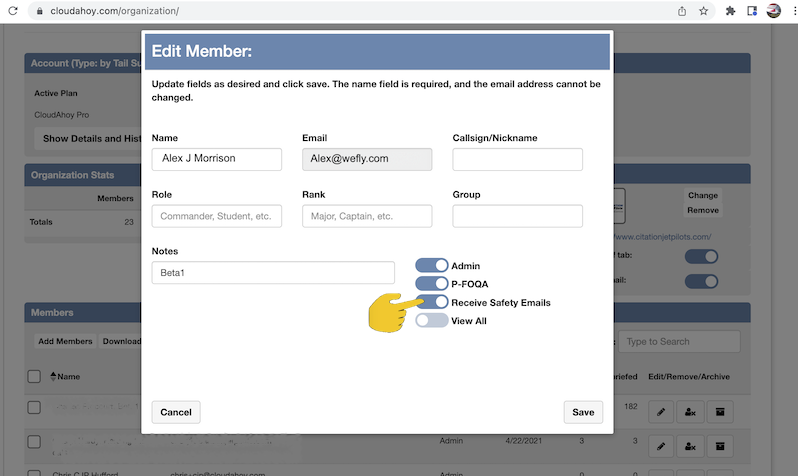
Turn on the ‘Receive Safety Email’ switch
July-20, 2022 (Beta)
Highlights
- Roles: Who can use pfoqa? enable P-FOQA by an admin
- Dashboard: enhancements – more things are clickable
- Debriefing a flight with exceedances – improvements
- Additional flight parameters: runtime remaining (note: the histogram will show up empty, database refresh will take place tonight 7/20, tomorrow the histogram will be populated)
Details
> NEW: Who can use pfoqa?
IMPORTANT
All current admins will loose access to pfoqa. We at CloudAhoy will set up those permissions to some of you, but – if we missed one of you or somebody else in your organization and you are an admin you should be able to do it yourself.
An admin can grand P-FOQA permission to any member of the organization.
- Login to www.cloudahoy.com/organization
- Sort the list of members: you can see who are the admins in your org
- Use the Edit button
 to edit their permissions.
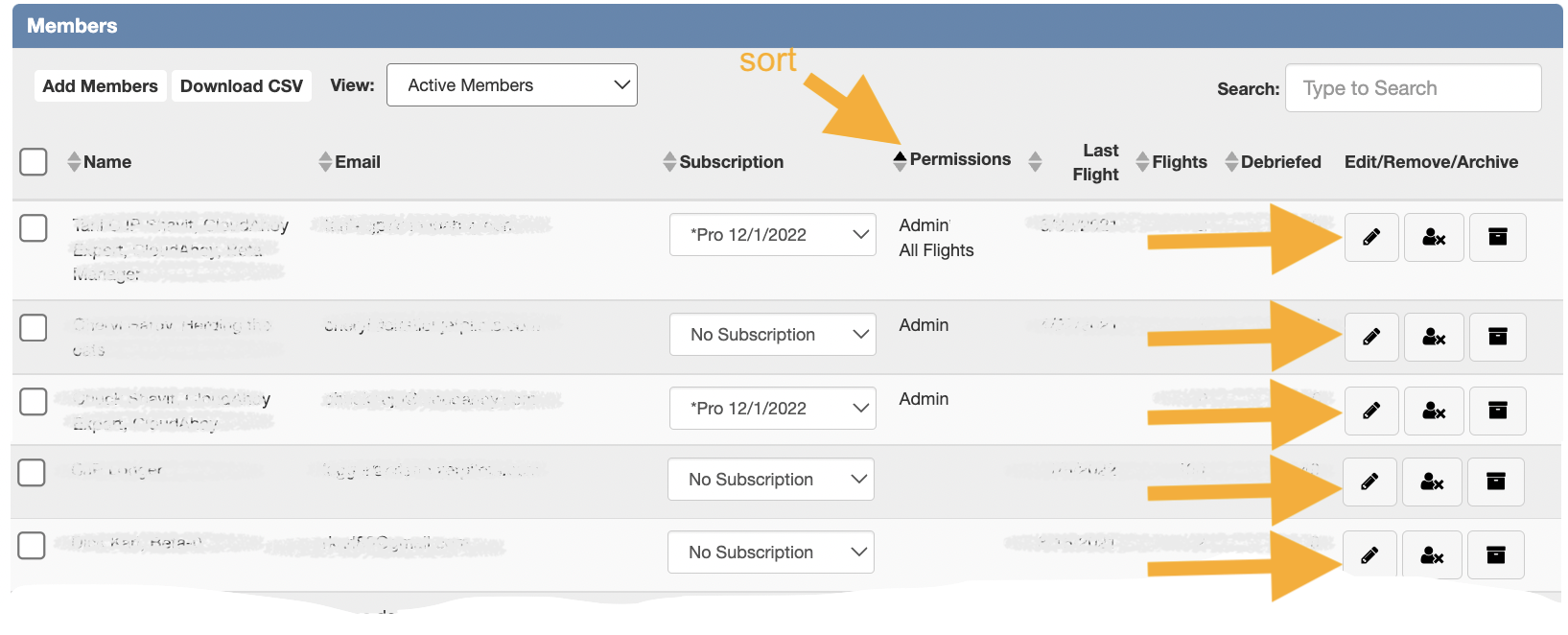
Sort by permission, and click the Edit button (step 1 and 2)
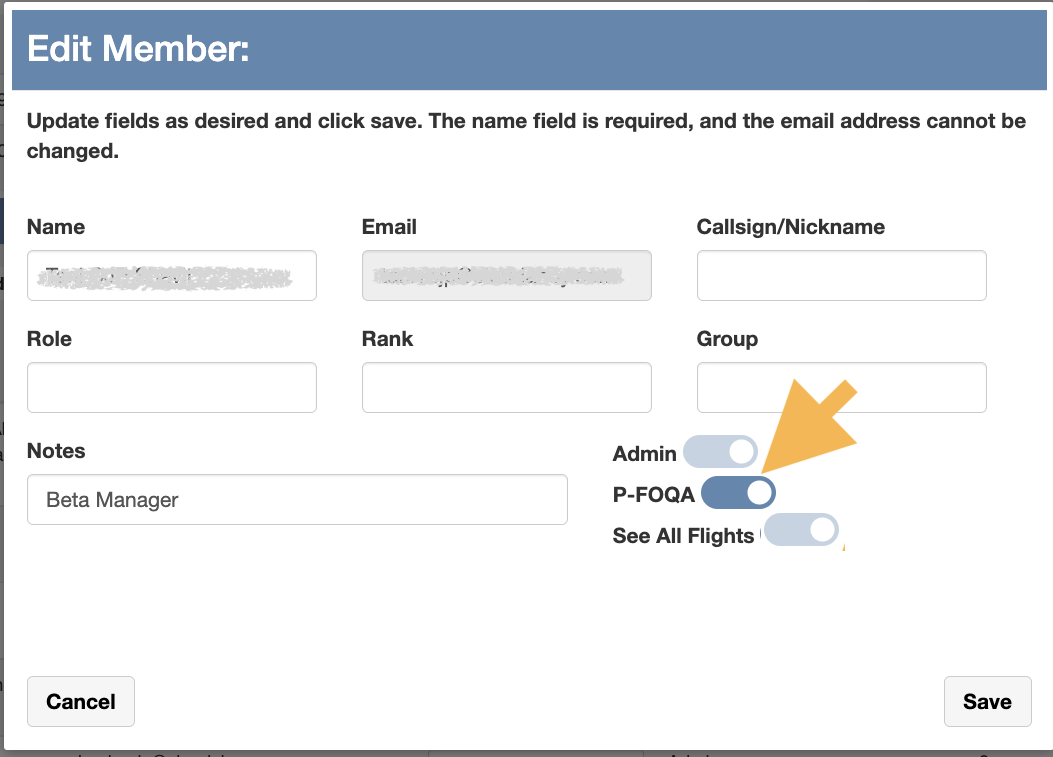
In the Edit dialog, set the P-FOQA permission
You can go to the Organization Manager from the “Roels and Policies” tab in P-FOQA:
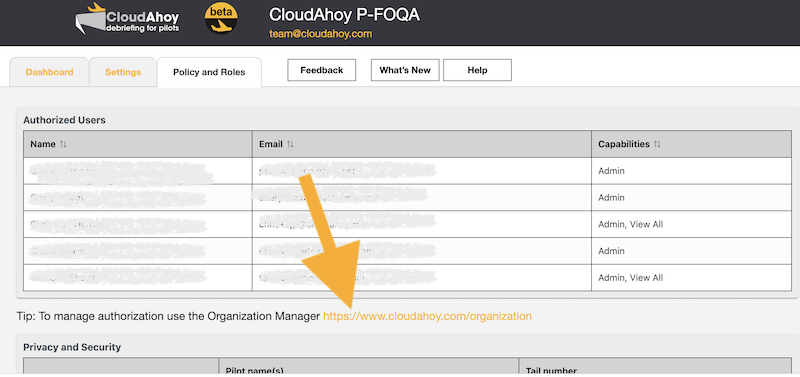
Note to Beta users:
Prior to this upcoming release, all org admins automatically received P-FOQA permissions. Starting in this release, an admin can give P-FOQA permissions unrelated to other admin rights (e.g. subscription management, envelope, etc.). We plan to use similar mechanism for additional specific permissions (e.g. who can set the Exceedances – in the Setting tab – for the org)
> Dashboard: enhancements – more things are clickable, plus some other things
- There are many more things you can click on! Almost everything on the right side of the dashboard.
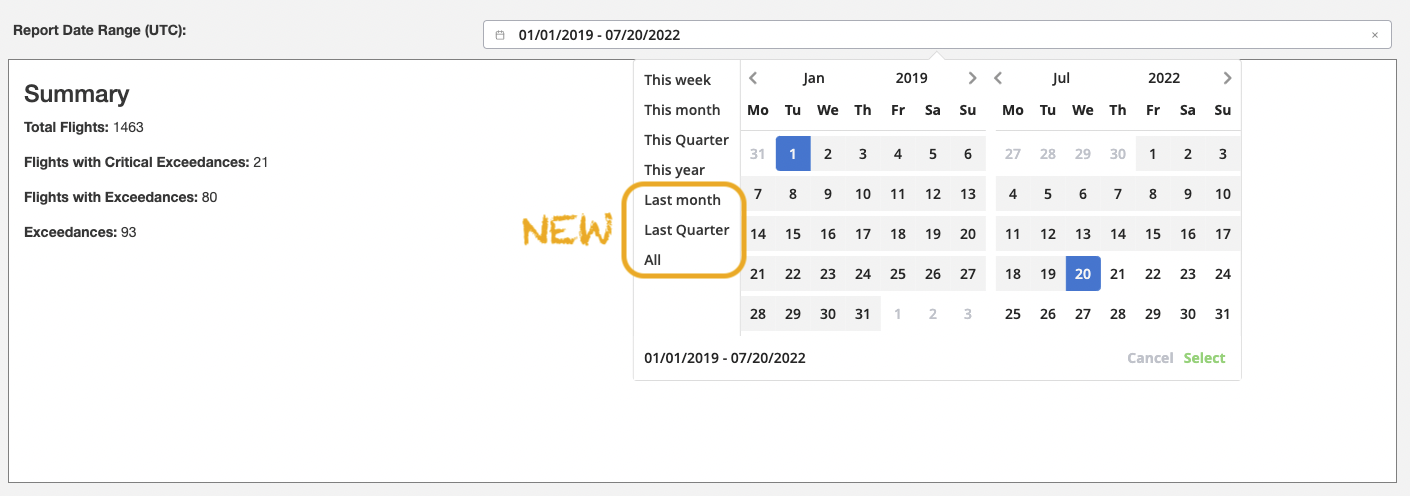
- Time-range now has last month, last quarter, all
- The exceedances /flight list now has a title which describers what’s listed
- There is a “show all” button, to display all exeedance in the time range
Some screenshots
When you click, notice the title – it reflects your selection: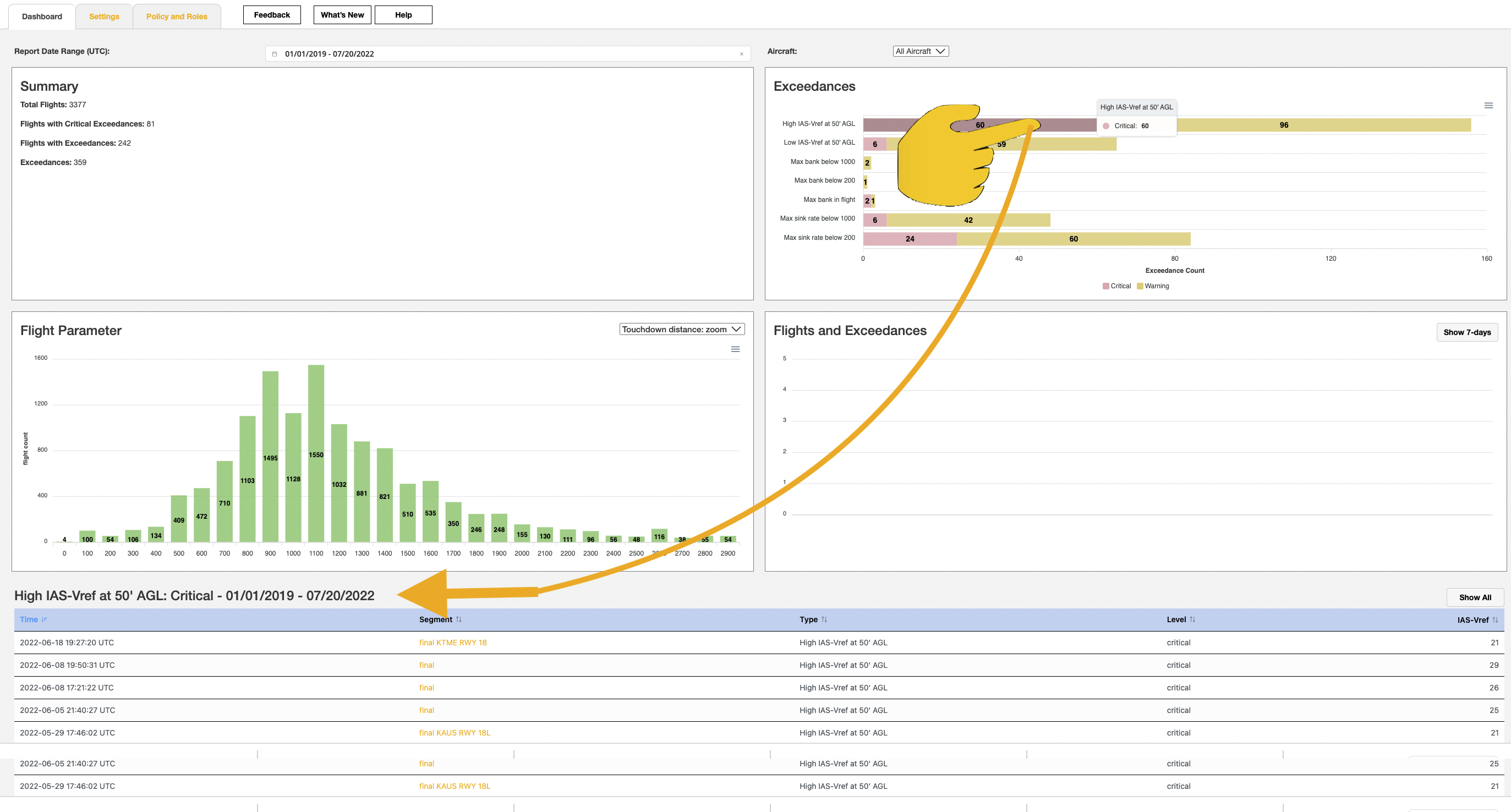
You can click ob any of those things now – the title will show what you selected.
Including the text with the name of the exeedance –> select all those exceedances (critical + warning)
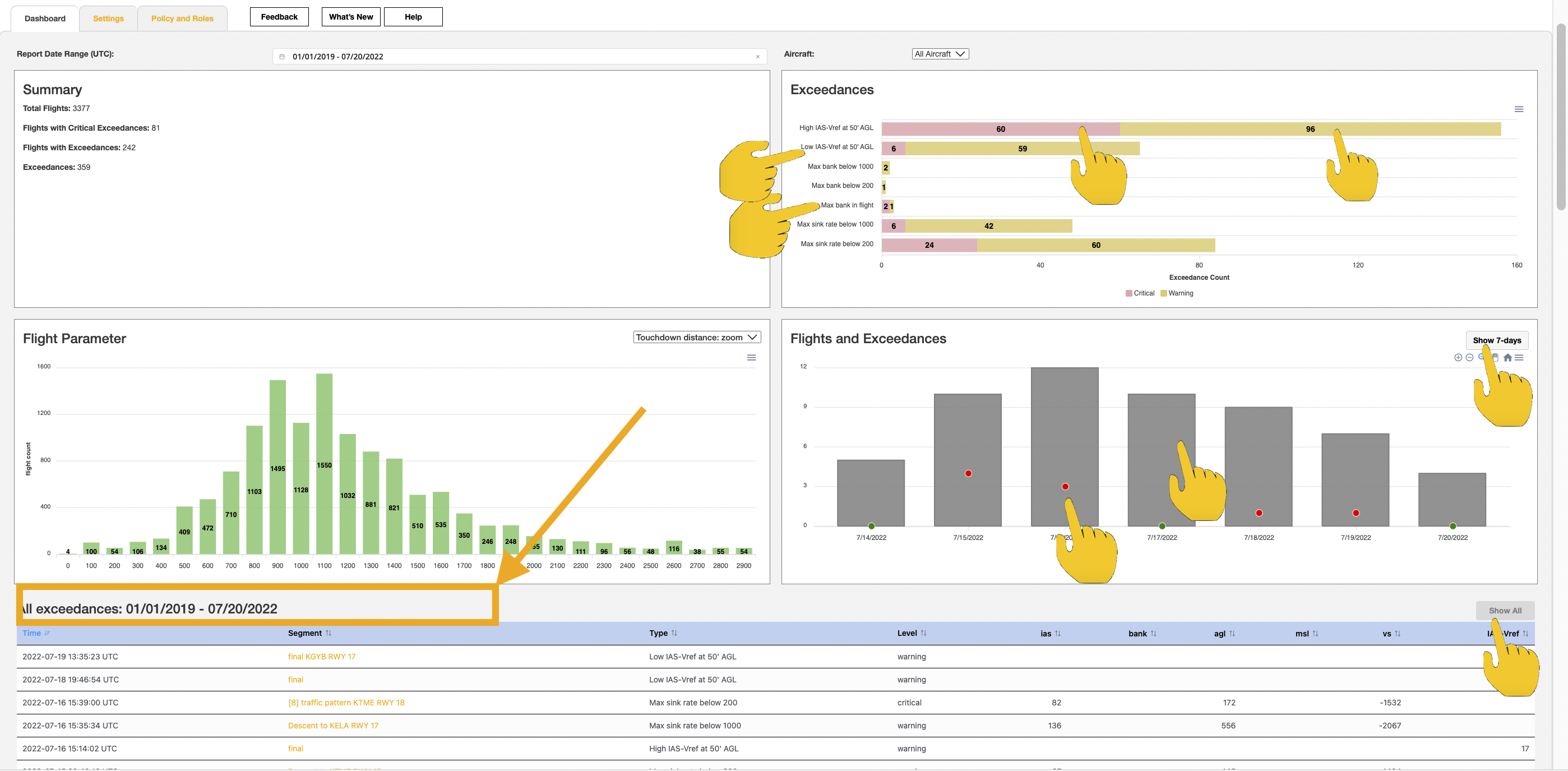
New time range options:
Further Reading
History (previous releases)
Beta-1: first beta release — June , 2022
What to expect
This is a very early beta, with partial functionality – a first taste. There are cosmetics and user-interface shortcomings which we are aware of, and will follow soon.
Who can use P-FOQA?
Right now CloudAhoy P-FOQA can be used for an organization which has been enabled to participate in the beta.
An admin of an organization which has been enabled for P-FOQA can login using your normal CloudAhoy email/password.
The Dashboard
There are 4 quadrants, and (hopefully) pretty self explanatory. Below the quadrants there is a list of flights which were detected – you can click on each on of them and it will open a debrief window, and the time is set to the time of this exceedance.
Things to notice:
- You can change the date range
- You can filter by aircraft type

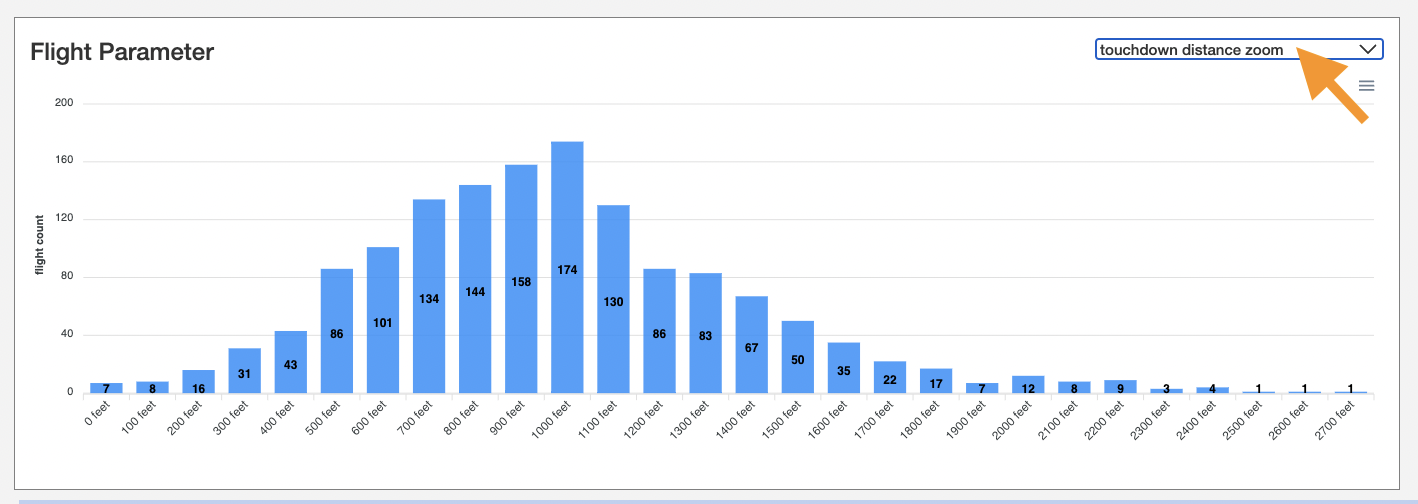
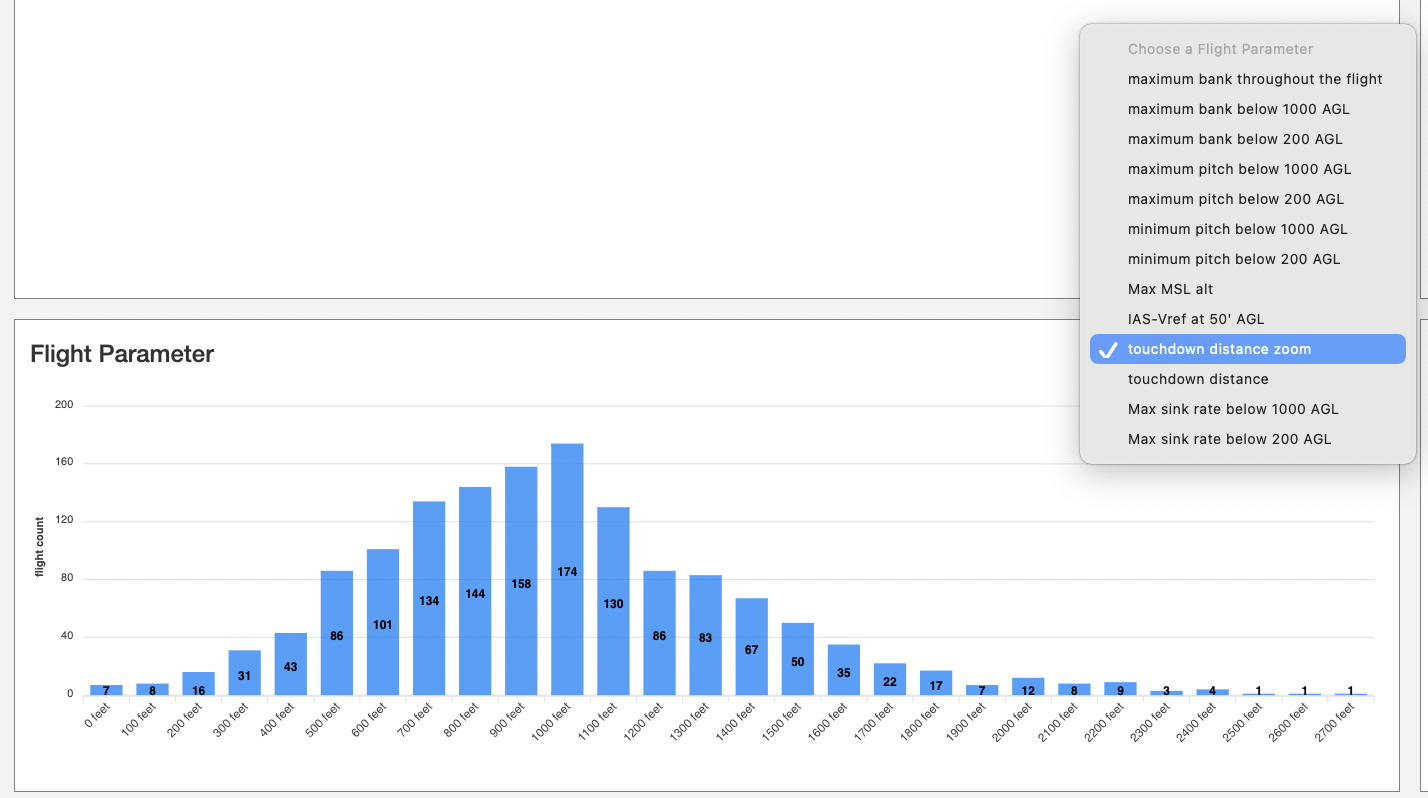
- The bottom-left quadrant has a drop down menu, which lets you choose different histograms
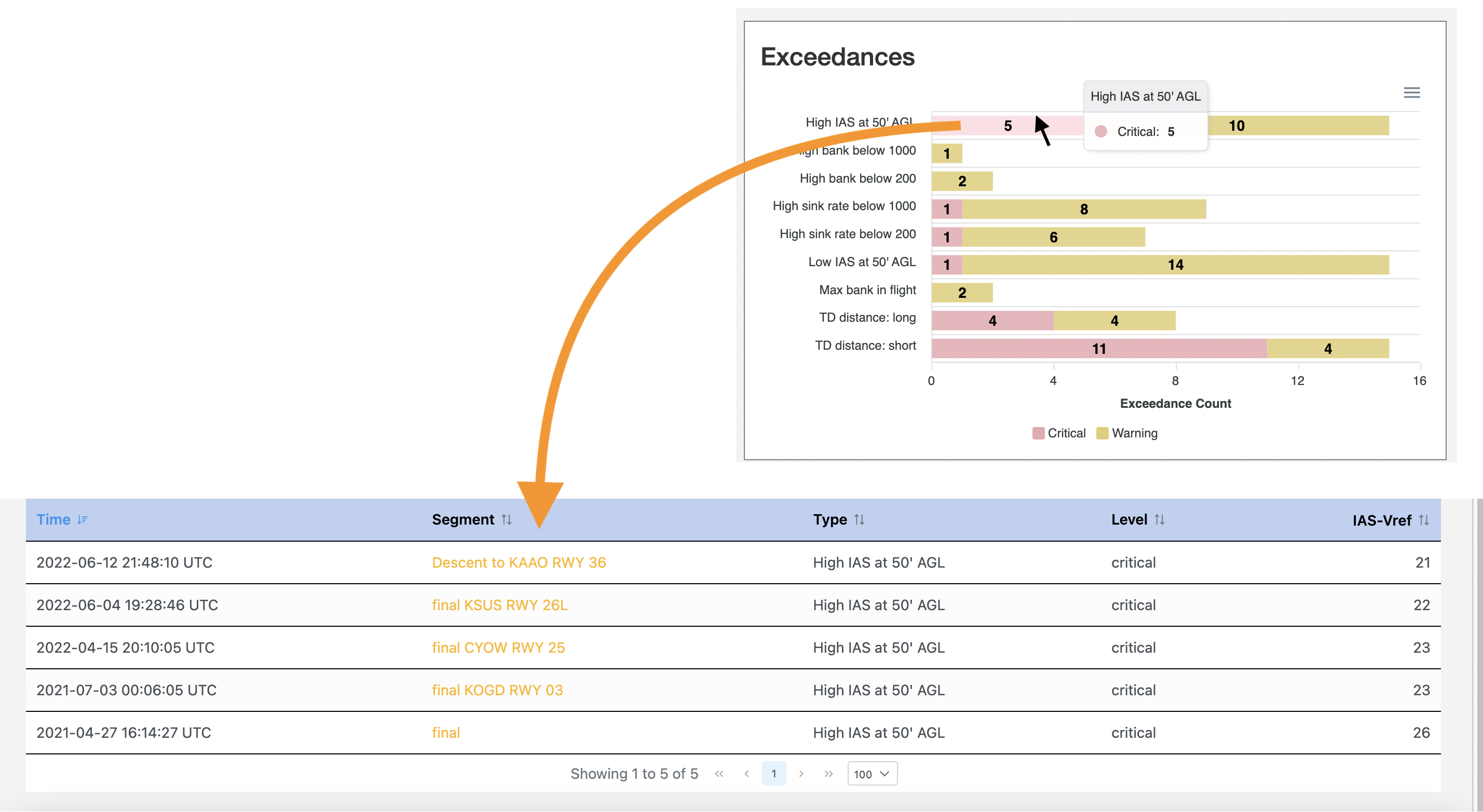
- The top-right quadrant is clickable: click on any of the specific excedances and get a list of the flights which have this exceedance.
- The bottom-right quadrant always shows 1 weeks, which is the last week of the selected date range
- Bellow the quadrants there is a flight list, of all the flights in which an exceedance has been detected.
The Setting tab
This tab lets you set the flight parameters which define SOPs / exceedances. You can enable or disable them, and set up the tolerances – then click the SAVE button. When you go back to the Dashboard it is automatically updated to reflect the newly saved flight parameters.
Things to notice:
- When you SAVE, you get your own version of the flight parameters setting; thus – there is not (yet) a way to share a flight parameters setting among all admins of the org.
The Roles & Policies tab
This tab is for display only: it shows the current setting of Roles. As of now we have only 2 roles:
– admin: can login into p-foqa, and can create their own version of flight parameters in the Setting tab. When they debrief a flight it will be anonymized (tail number and pilot(s) name(s) are not visible.
– view all: an admin which has this privilege will be able to see the names and tail# of the flights.
More refined roles will be released soon.
Known Issues
This is an early beta release, and capabilities are only partially implemented. Some important known issues:
- When a flight has multiple exceedances, only one will be shown at a time.