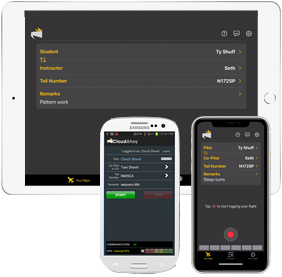
The free CloudAhoy apps provide the easiest way to log your flights.
The CloudAhoy app also allows you to import flight data recorded using other sources, such as ForeFlight and Garmin Pilot.
CloudAhoy v6 for iOS

- User interface
- Pre-Flight tab
- Log flights, Start/Stop
- Crew names and remarks
- In-Flight Tab
- Name changed: used to be called “CFI” tab
- Debrief Tab – debrief your flight!
- Pre-Flight tab
- Multitasking – supports multitasking which became available in iOS 13
- This is useful for using the In-Flight tab to create markers and custom maneuvers during a flight, while using EFB such as ForeFlight.
- Setting Default tab – Pre-Flight tab or Debrief tab,
- By default when you start the app it is in the Pre-Flight tab, ready to log a flight
- In V6 you may set the default so that when you open the CloudAhoy app it will open directly to the Debrief tab, . This useful if you have a configuration which flight data is uploaded automatically (e.g. AirSync).
- To change the default tap the setup icon
 on the upper-right
- Location Services
- You can use use the “While Using App” setting in iOS
- You can used “Never” if you are not using the app for Logging (e.g. you are configured to automatic upload with AirSync, or you import flights using SD card)
- Organization Branding – see your logo
- Users who belong to an organization will see their logo alongside the CloudAhoy logo
Further Reading
CloudAhoy App: iPad
CloudAhoy App: iPhone
Logging simulated flights
Importing flights